Author: Ozkan Gelincik

  • From Legacy to Pro: How I Rebuilt My Finance Analytics App to Scale with DuckDB, S3, and Python Shiny

    From Legacy to Pro: How I Rebuilt My Finance Analytics App to Scale with DuckDB, S3, and Python Shiny

    My original Python Shiny finance app worked well locally. But as soon as I tried to deploy it with a larger, more realistic dataset, it broke. The reason was simple: the app assumed the full dataset should live in memory. That assumption became the bottleneck for everything, from multi-year backtests to event studies.

    The first version was a classic working prototype. It loaded a Parquet dataset into pandas, did the heavy lifting in memory, and powered the UI from one large DataFrame across three workflows:

    • Portfolio Simulator for buy-and-hold backtests
    • Sector Explorer for equal-weight sector indices
    • Event Study Studio for market reaction around SEC filings and split events

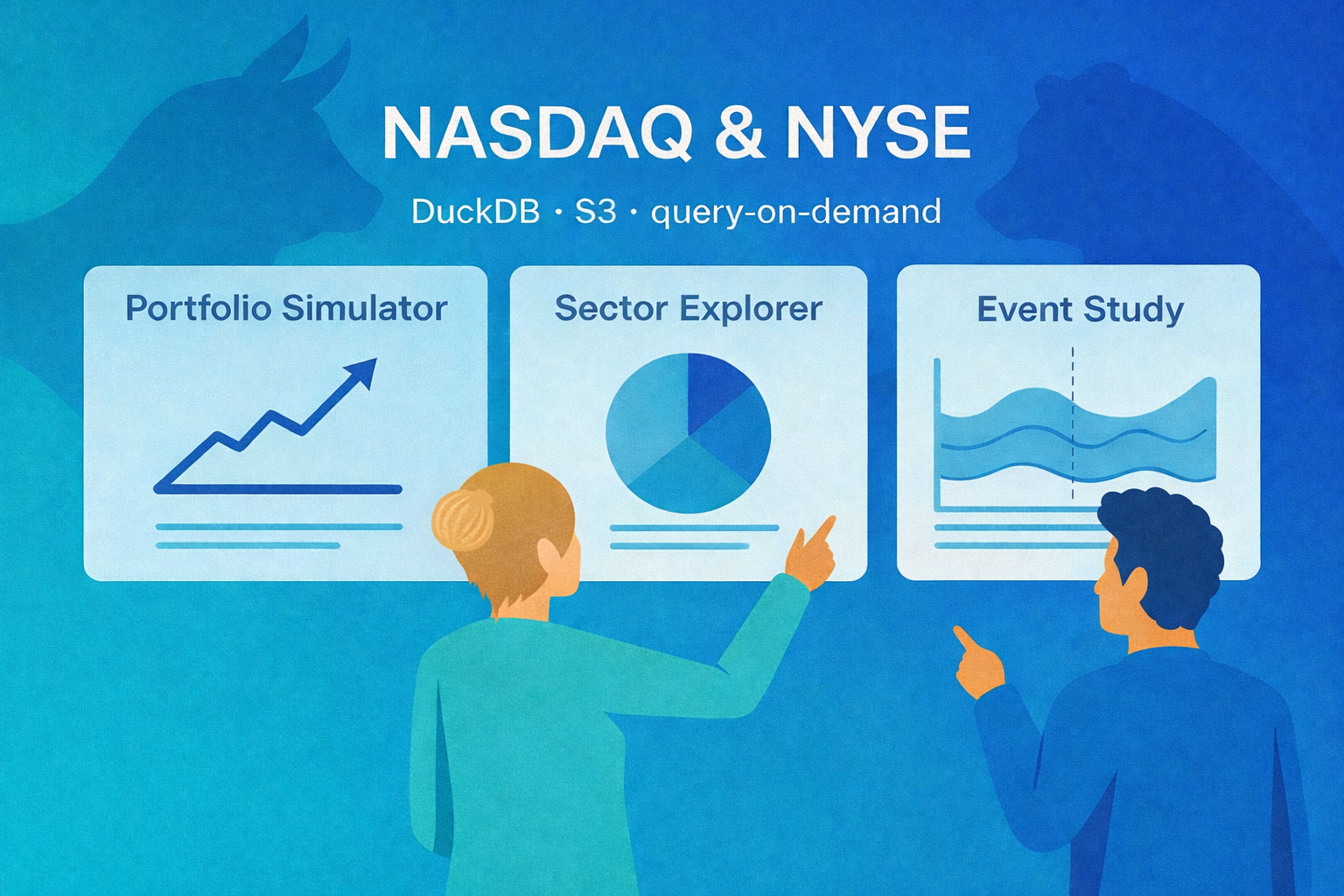
    This post is the story of how I turned that prototype into a “pro” app that can handle more years of data, answer richer user questions (like seasonality), and run an event study over a much larger set of events. The core driver behind everything: solving the dataset size problem by switching from pandas-first to DuckDB + S3 + query-on-demand.

    🚀 Try the Portfolio, Sector & Event Lab Pro Now!

    Legacy vs Pro at a glance

    Legacy: pandas in memory → UI

    Pro: UI → DuckDB → S3 Parquet

    FeatureLegacy AppPro App
    BackendpandasDuckDB
    Main data accessLocal / lighter runtime assumptionsS3-hosted Parquet
    Dataset strategySmaller in-memory sliceThin app-optimized dataset
    History window1 year3 years
    Event study robustnessLowHigh
    ScalabilityModerateStrong
    Deployment resilienceFragile with larger dataRobust

    The legacy architecture (why it was great. And why it hit the wall)

    The legacy version was simple by design:

    • store a Parquet dataset locally in outputs/
    • load it into pandas at startup
    • compute helper columns and UI choices from the full DataFrame
    • slice and pivot in pandas for the portfolio and sector workflows
    • build event windows in Python for the event study

    That design was great for prototyping. It was easy to reason about, easy to debug, and fast enough on a local machine. But it had a hard ceiling: memory.

    Bigger data meant massive RAM usage, sluggish cold starts, and inevitable crashes. The practical outcome was painful: deploying with a realistic, multi-year dataset caused fatal memory bottlenecks, artificially limiting the scope of analysis I could offer users.

    That last point became the real product problem.

    The user question that made the limitation obvious

    One of the clearest signals that a system needs to evolve is when a user asks a reasonable question that it cannot answer.

    A user told me he had vested META shares and asked:

    “Can you show more years of returns so I can see if there’s a pattern? I want to time my sale.”

    That was really a seasonality question. He was not asking for a prediction model. He wanted a longer historical view so he could inspect whether certain periods tended to be stronger or weaker.

    With the legacy app, I could not support that reliably. Expanding the dataset enough to answer the question made the deployed app unstable. That was the moment the dataset-size issue stopped being a technical annoyance and became the main reason to redesign the architecture.

    What changed in the pro rebuild (the new principles)

    I set a few goals that directly addressed the memory and scale bottleneck:

    • stop loading the full dataset into pandas at startup
    • host the dataset remotely so deployment is not tied to local files
    • query only what the user asks for instead of “load everything”
    • keep more years of data so users can explore seasonality and long-term patterns
    • make the event study more statistically robust by pulling from more events over longer history

    These goals pushed the pro version toward DuckDB + S3 and away from a load-everything design. That shift did more than improve performance. It expanded the range of questions the app could answer.

    What the pro dataset includes

    The pro dataset keeps only the fields the app actually needs: date, ticker, close, logret, sector, filing_form, is_split_day, is_reverse_split_day, market_cap, tidx (per-ticker trading-day index for ±k windows), year.  

    It is stored as Parquet in Amazon S3 and queried at runtime through DuckDB. 

    Why S3 matters (beyond deployment)

    Hosting the dataset on S3 did more than “make deployment possible.”

    It also made the app architecture clean:

    • the app is UI + query logic
    • the dataset is a durable remote artifact
    • updating the dataset becomes a pipeline problem, not an app problem

    It also made the app configurable via environment variables:

    • AE_S3_URI points to the S3 Parquet file
    • if not set, the app uses a safe default S3 URI

    So local dev and deployment share the same code. Only configuration changes.

    The core mechanism: query-on-demand with DuckDB

    UI input → DuckDB query → S3 parquet → filtered result → Plotly chart

    Once DuckDB is connected, the app creates a view:

    CREATE OR REPLACE VIEW ae AS
    SELECT * FROM read_parquet('s3://...');

    From there, each workflow is powered by a small, targeted query:

    • Portfolio Simulator: selected tickers + date range
    • Sector Explorer: selected sectors + date range
    • Event Study: selected event types + date range + window ±k

    The pro pattern is simple:

    • user selections become SQL filters
    • DuckDB returns only the slice needed
    • pandas handles light transformations
    • Plotly renders the result

    That is what eliminated the memory crashes. The app no longer has to load the full dataset before it can do anything useful. In other words, the app no longer starts by loading everything. It starts by asking, “What does the user need right now?”

    Deploying the pro app

    Moving to DuckDB + S3 solved the main memory bottleneck, but deployment still required some production-minded cleanup: excluding large local artifacts from the deployment bundle, keeping only required CSV and UI assets in the app directory, making the S3-hosted parquet readable at runtime, and deploying the pro version as a separate app instead of overwriting the legacy one.

    The “more years” payoff: seasonality and long-horizon questions

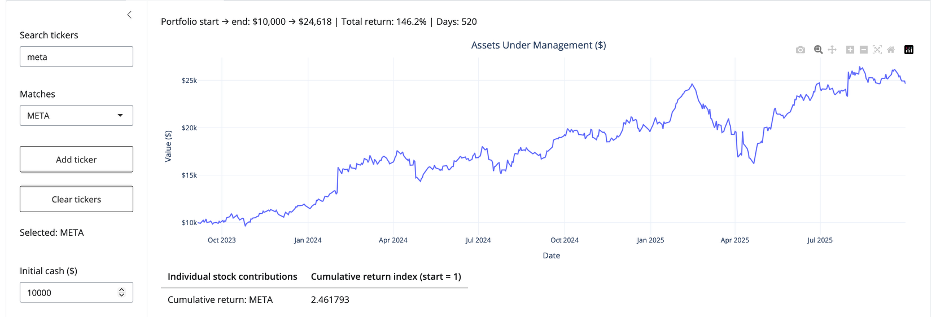
    Now the app can actually answer the META vesting question in a meaningful way.

    With more years of data, users can explore:

    • seasonality (does the stock tend to rally in certain months?)
    • year-over-year behavior (does the stock exhibit recurring cycles?)
    • drawdowns and recoveries across multiple regimes (bear, bull, rate hikes)

    Even without adding a dedicated “seasonality panel,” simply allowing multi-year return series makes those patterns visible and testable (as shown below for META). 
    Event Study gets better when the dataset gets bigger

    The event study studio benefits directly from longer history.

    In an event study, sample size means events. With only one year of data, you get fewer filings, fewer split events, fewer observations per event type, and noisier averages.

    With more years of data, the event study becomes more useful because it can:

    • pull from a larger pool of events
    • produce more stable averages
    • narrow confidence intervals, all else equal
    • make rarer event types more analyzable

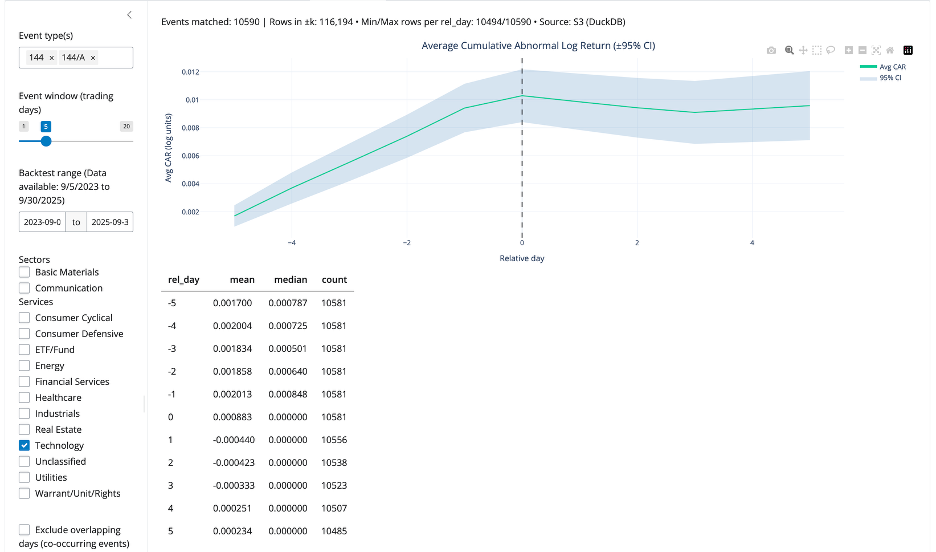
    So, the same architecture change that solved memory also improved statistical quality. This improvement is not abstract. With the expanded dataset, the app captured 10,590 Form 144/A events, giving the Event Study workflow a much stronger empirical base for estimating cumulative return patterns in selected sector (see below).
    The “pro” event-window technique that made it reliable

    The pro event study uses tidx, a per-ticker trading-day index, that lets the app build ±k trading-day windows without worrying about weekends and market holidays.

    In SQL, the method is:

    • find each event date’s tidx
    • generate offsets from -k to +k
    • join back to the panel on (ticker, tidx)

    During debugging, I hit a DuckDB-specific column naming gotcha around range(). The fix that stabilized everything was:

    offsets AS (
      SELECT * EXCLUDE (range), range AS rel_day
      FROM range(-{k}, {k} + 1)
    )

    That small change made the offsets table produce the exact column shape the rest of the query expected. After this, the event study workflow became stable.

    What improved in the pro version (the outcomes)

    After the rebuild, the app is fundamentally transformed. By decoupling the UI from the dataset, the app is faster, deployment is perfectly stable, and most importantly, the statistical power of the event studies and multi-year backtests is vastly improved.

    Closing thought

    Scaling from pandas to DuckDB and S3 wasn’t just an infrastructure upgrade—it was a product upgrade. Overcoming the memory bottleneck transformed ‘more data’ from a deployment risk into a core feature, ultimately scaling the complexity of the questions the app can answer.

    🚀 Try the Portfolio, Sector & Event Lab Pro Now!

  • Mental Health in Tech: Which Workplace Policies Work?

    Mental Health in Tech: Which Workplace Policies Work?

    This post examines mental health in tech and which workplace policies are most associated with higher treatment-seeking among employees.

    TL;DR  

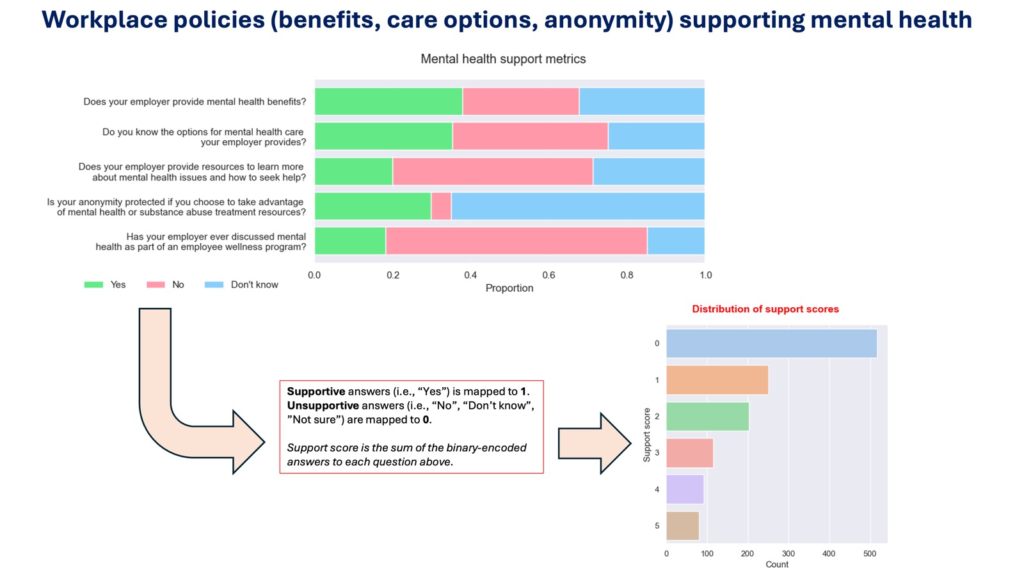
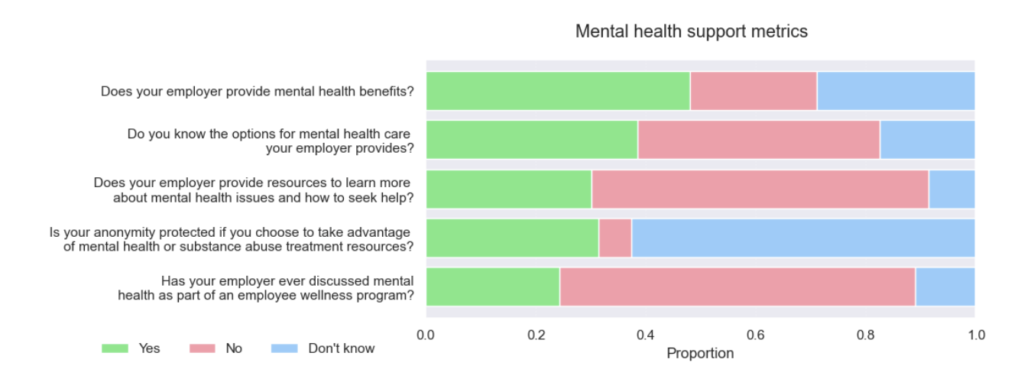
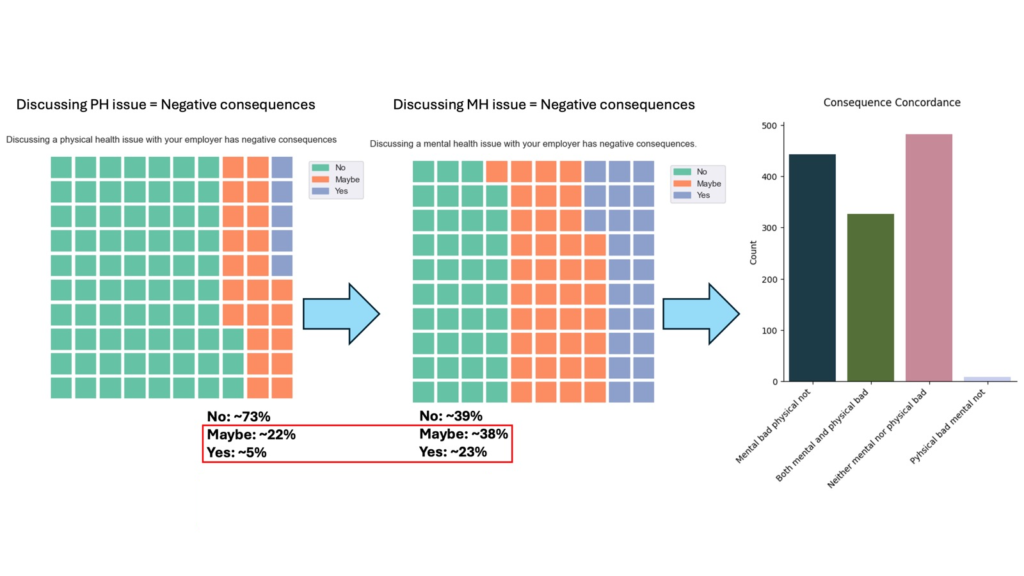
    When it comes to mental health, tech workers report a big trust gap: they expect negative consequences for discussing mental health far more than physical health.  As a result, they don’t even look into what the policy at their company is. That is a major problem because awareness is as critical as access. Across benefits, care options, resources, anonymity, and wellness talks, “Don’t know” responses track almost as poorly as “No.”

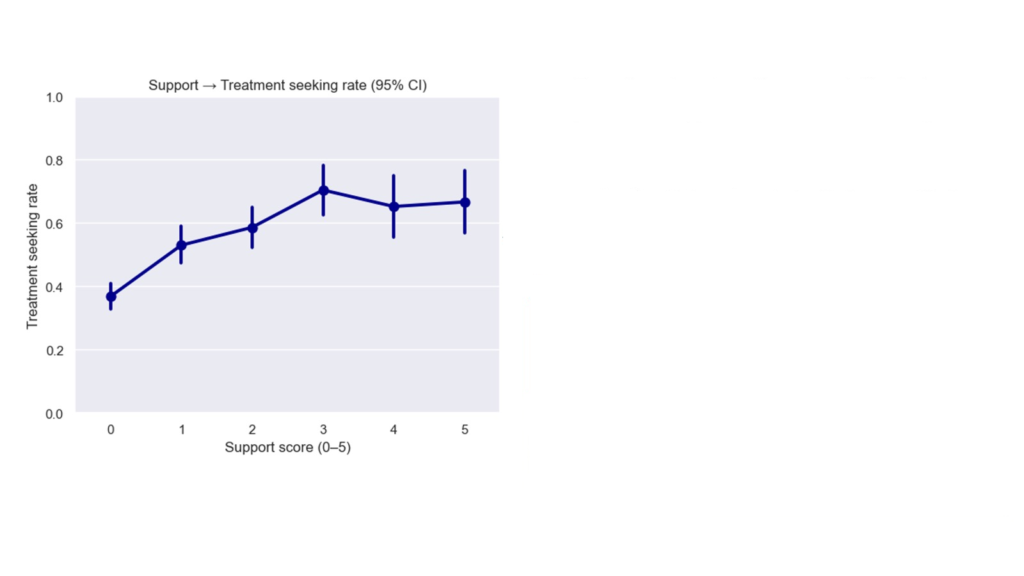
    A higher support score (visible benefits + clear options + resources + anonymity + wellness dialogue) is strongly associated with treatment-seeking, with big gains up to ~3 policies understood/visible.

    The business case is real: new research estimates burnout costs U.S. employers $4,000–$21,000 per employee per year(≈ $5M/yr for a 1,000-employee firm). Meanwhile, ~40%+ of tech workers have a high risk of burnout.

    The tech industry runs on attention and problem-solving—exactly what chronic stress erodes. I analyzed the Open Sourcing Mental Illness (OSMI) Tech Survey to quantify how visible, trustworthy workplace policies relate to help-seeking for mental health. The goal: turn anecdotes into actionable, ROI-aware guidance for teams and leaders.

    Data & Method (quick tour)

    • Dataset: OSMI Mental Health in Tech Survey (2014), 1,259 respondents, 27 variables (e.g., demographics; workplace policies: benefits, care options, wellness talks; perceived anonymity; and outcomes like treatment-seeking, work interference).
    • Key construct — Support Score: For each policy question, Yes = 1; No/Don’t know/Not sure = 0; sum across items → per-person support score.
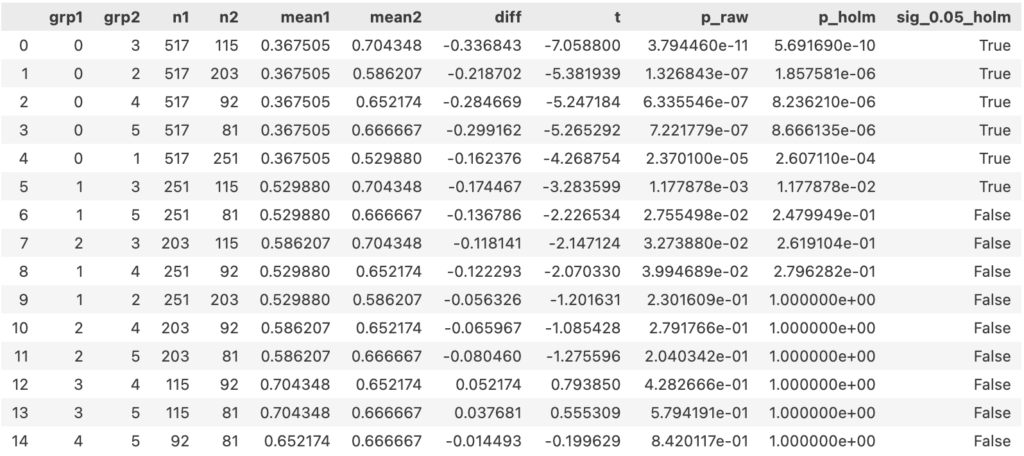
    • Stats: Welch one-way ANOVA + pairwise Welch t-tests to compare treatment-seeking across policy categories and risk factors (age, gender, family history, work interference).

    What I found

    1. Big stigma & trust gap

    Employees fear negative consequences far more when discussing mental vs physical health with employers. That effectively suppresses early help-seeking and exacerbates presenteeism.

    (PH: Physical Health; MH: Mental Health)

    1. Awareness is leverage (and often missing)

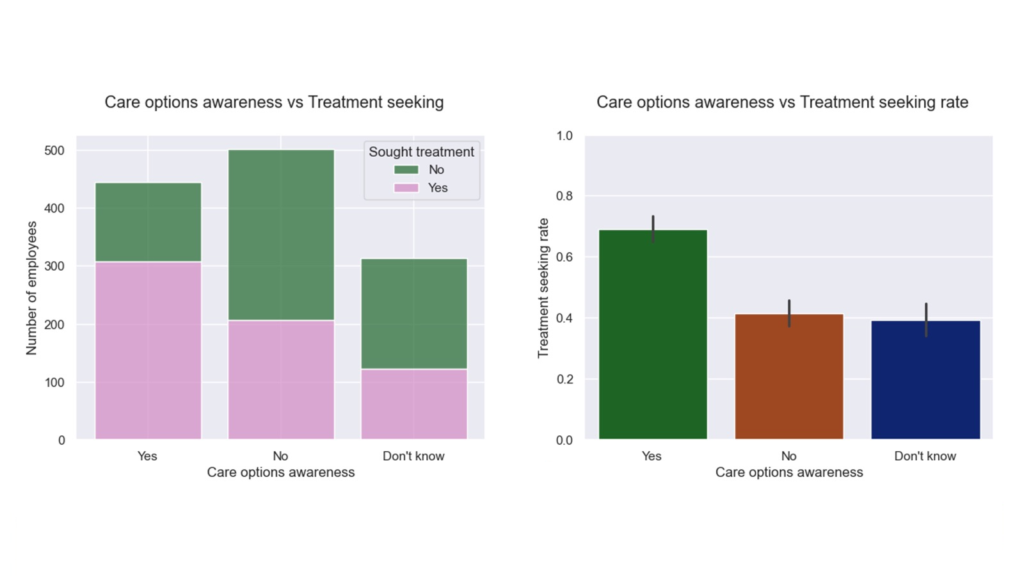
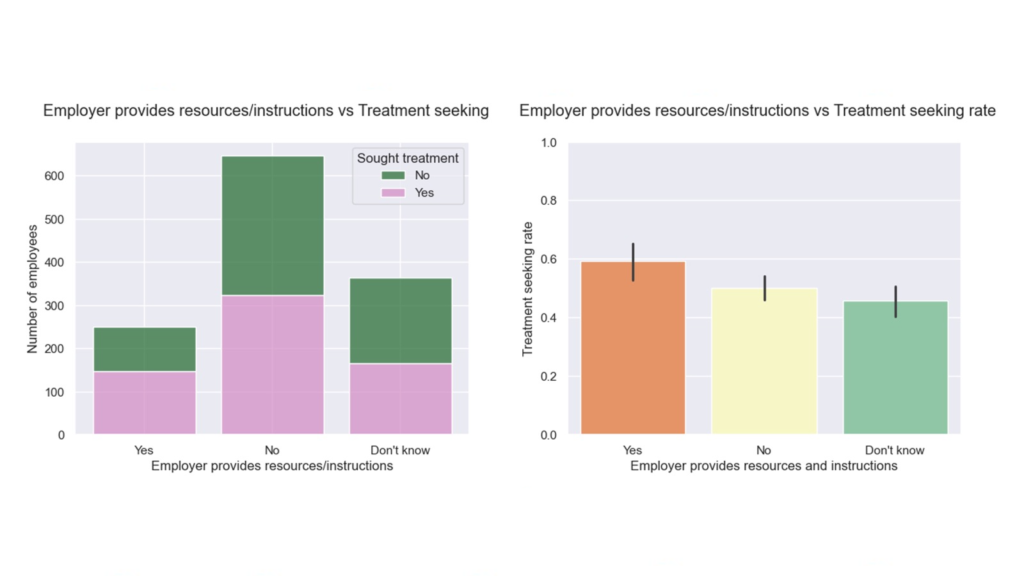
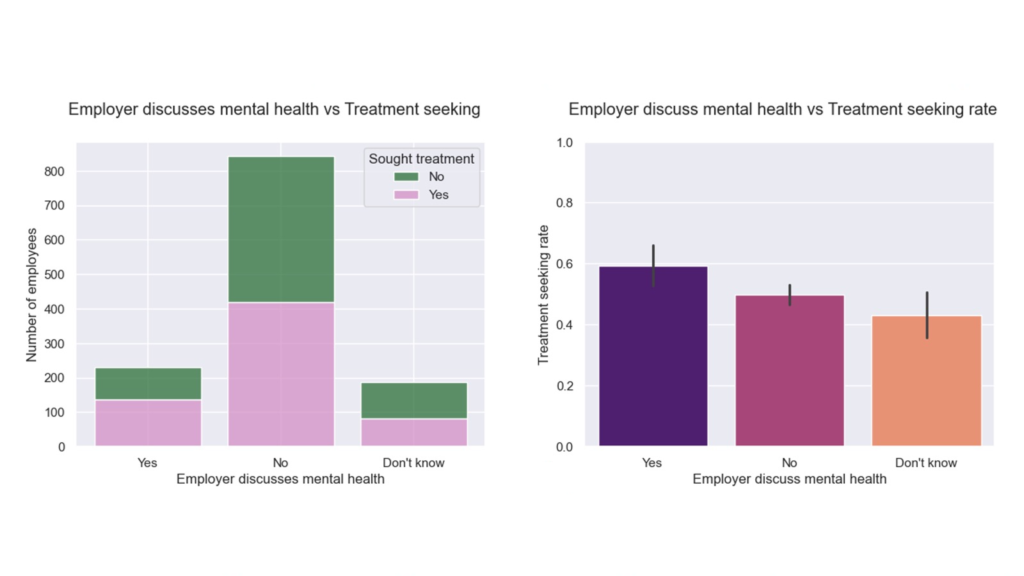
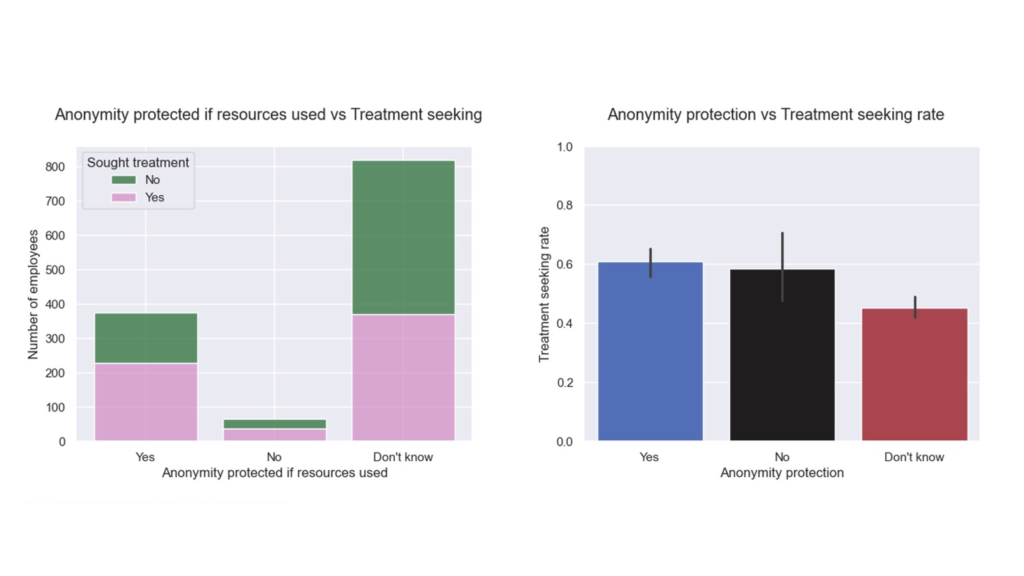
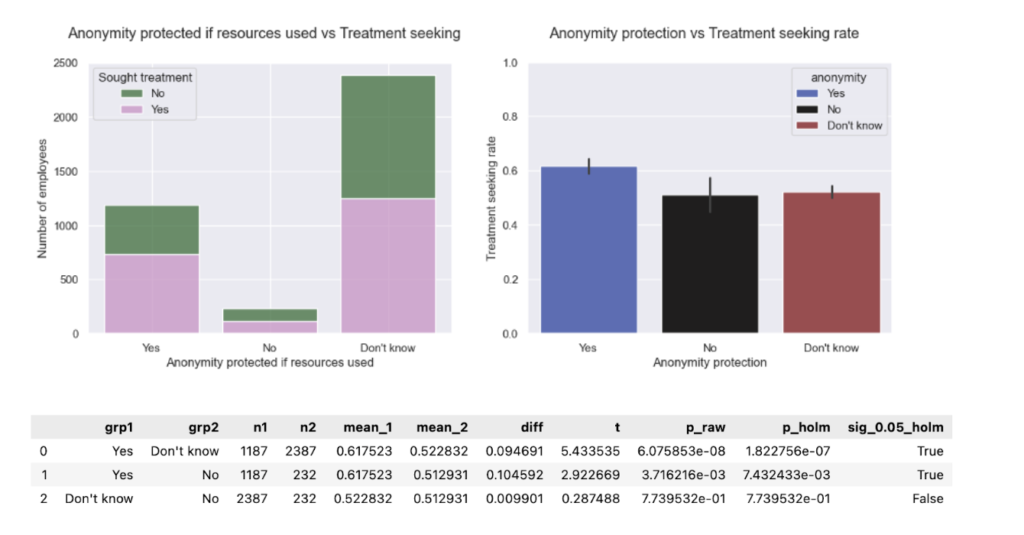
    For benefitscare optionsresourcesanonymity, and wellness programs, large shares answered “No” or “Don’t know.” Those “Don’t know” groups repeatedly underperform “Yes”—often similar to “No.” In other words: communication gaps erase ROI.

    1. Support drives action

    Higher support scores correlate with higher treatment-seeking, with strong gains up to ~3 understood/visible policies (then a plateau). Practical takeaway: while you may not need every program, it is critical to make a few core policies visible and trusted. 

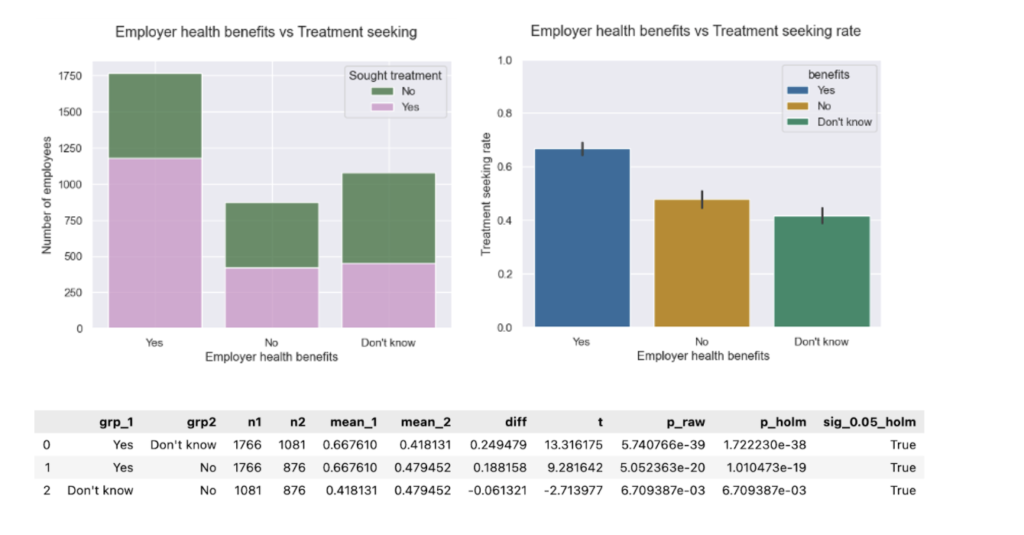
    One-way ANOVA followed by pairwise Welch’s t-test:

    Employees with support score ≥1 were more likely to seek mental health treatment than those with support score 0.

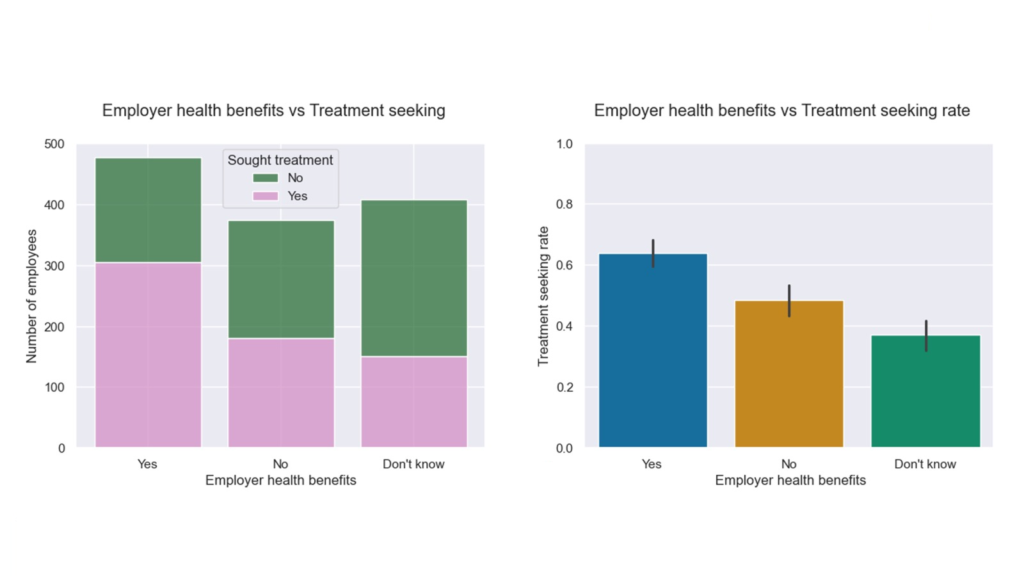
    • Benefits present → higher treatment-seeking. Lack of awareness can be worse than not having benefits.

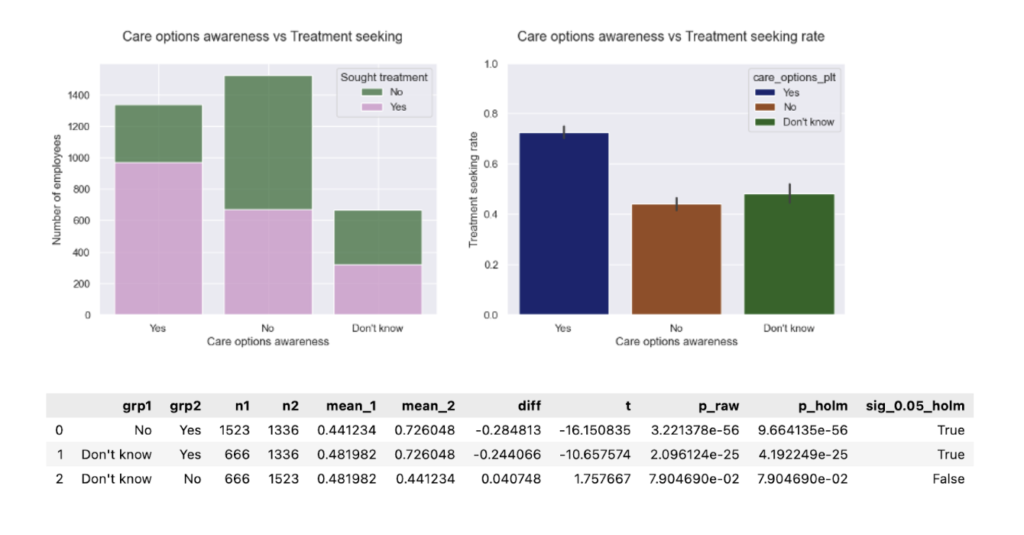
    One-way ANOVA followed by pairwise Welch’s t-test:

    • Know your options → action spikes. When employees know what care options are available to them, they’re far more likely to seek help.

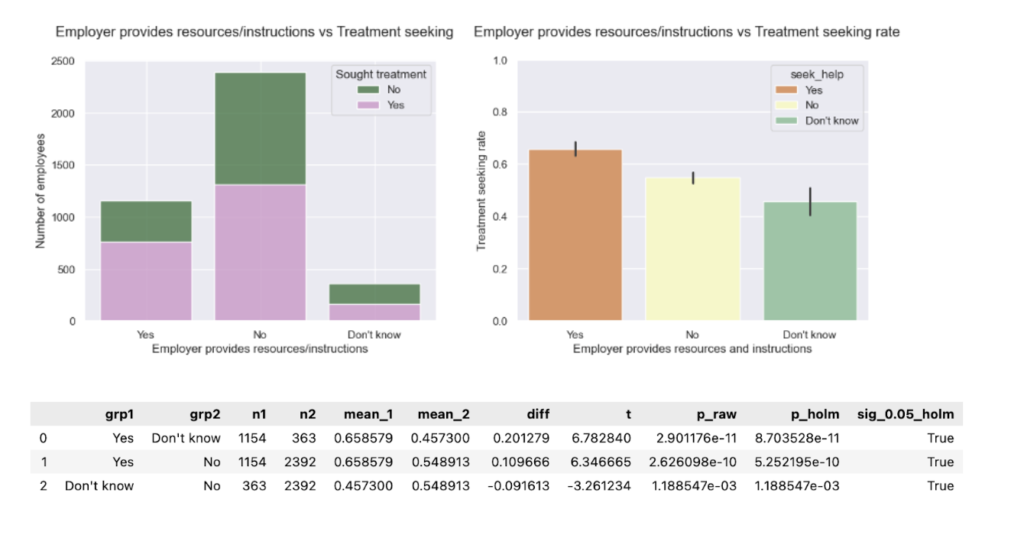
    One-way ANOVA followed by pairwise Welch’s t-test:

    • Resources provided → highest treatment-seeking (~59%). Practical guides matter.

    One-way ANOVA followed by pairwise Welch’s t-test:

    • Wellness talks → higher help-seeking. Silence signals risk; conversation signals safety.

    One-way ANOVA followed by pairwise Welch’s t-test:

    • Anonymity clarity beats ambiguity. “Not sure if I’m protected” depresses help-seeking more than a clear “No.”

    One-way ANOVA followed by pairwise Welch’s t-test:

    1. Who’s at risk?
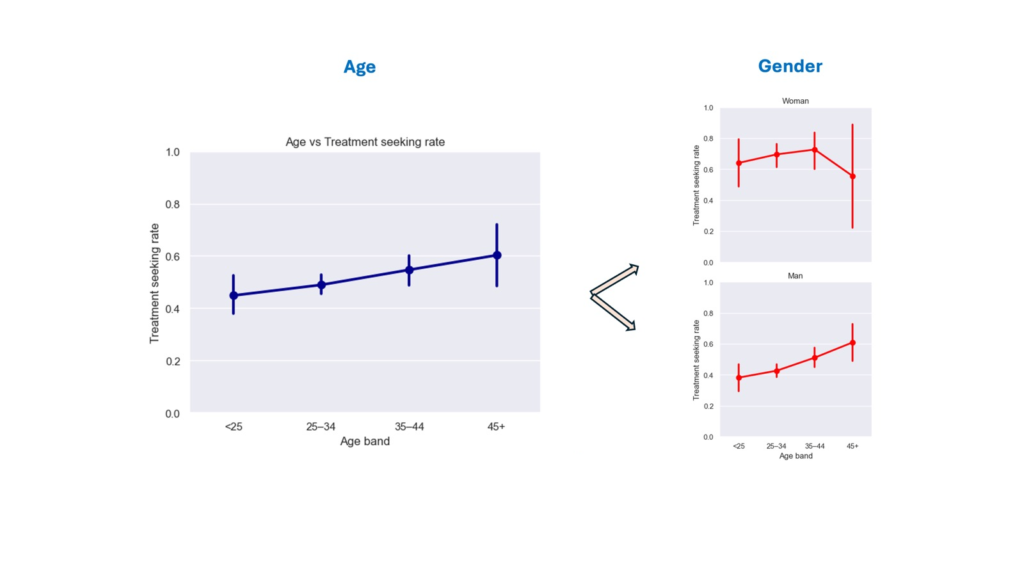
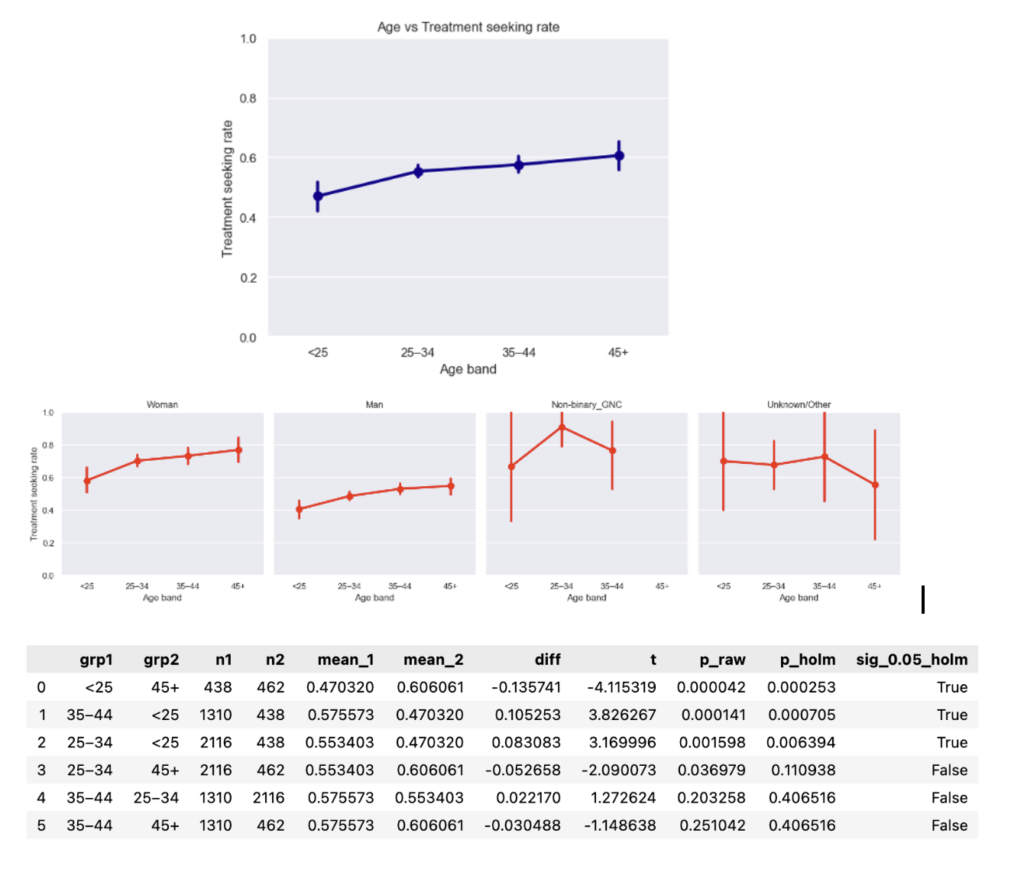
    • Younger men (<25 and 25–34) were least likely to seek treatment. Rates among men improve after 45, approaching women’s rates. Targeted manager training and tailored messaging can help ameliorate the age and gender gap.

    One-way ANOVA:

    Age-group differences in treatment-seeking did not reach conventional statistical significance (Welch one-way ANOVA, p = 0.058), but the near-threshold p-value provides weak evidence consistent with a small age effect in this sample.

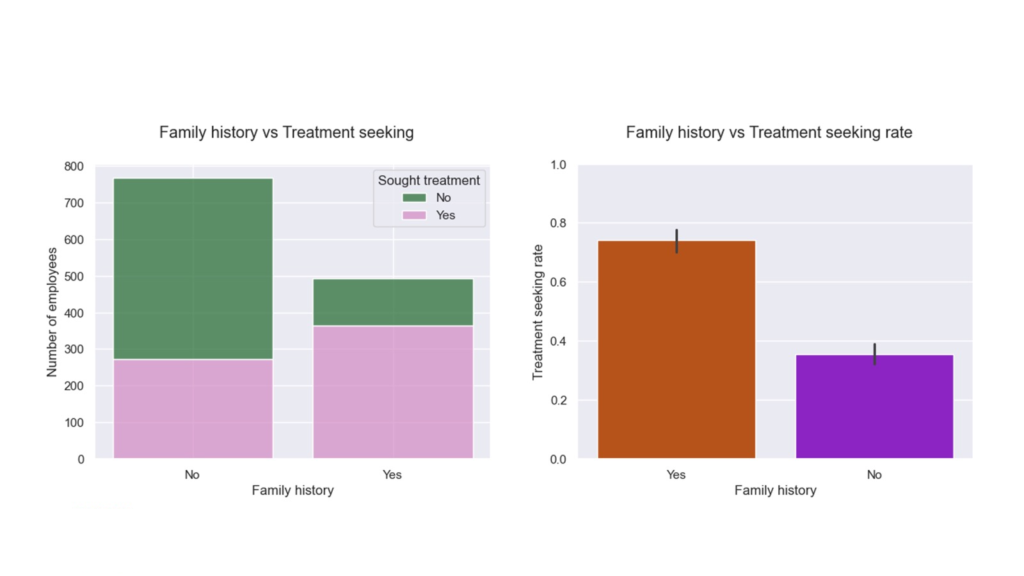
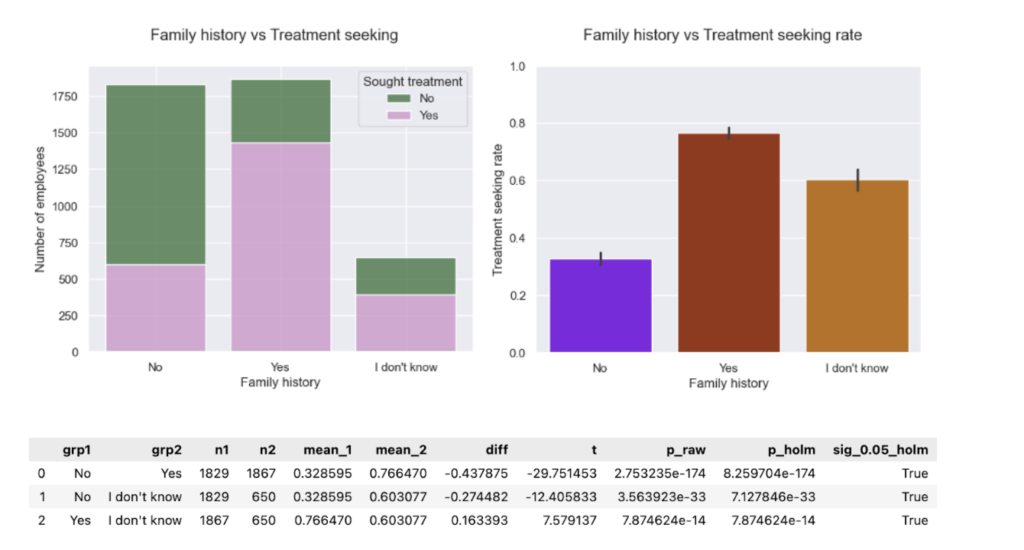
    • Family history of mental illness is linked to higher treatment-seeking—likely via awareness and recognition.

    Welch’s t-test:

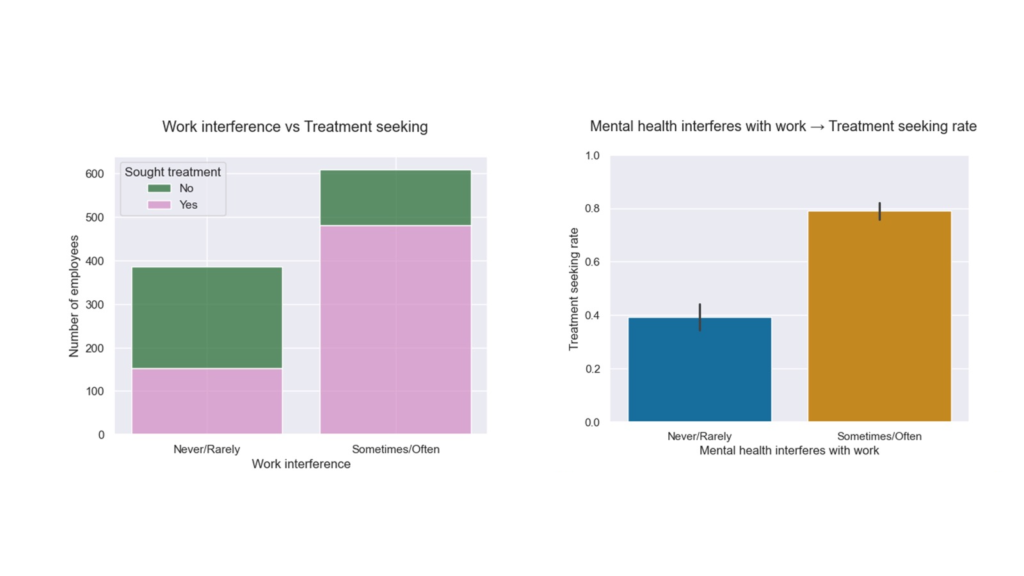
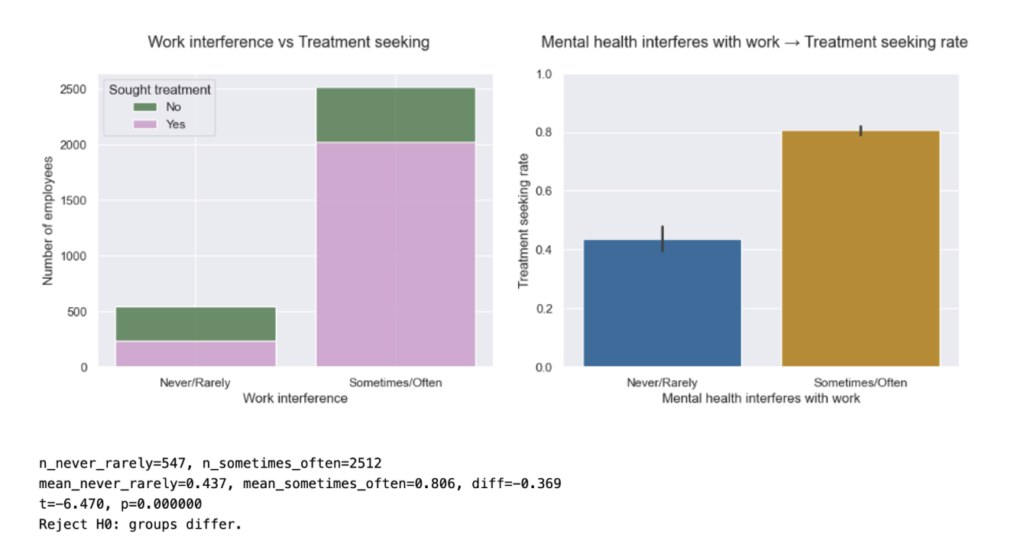
    • Work interference is a strong signal of demand. Those reporting frequent interference seek care much more often(significant Welch tests). Capacity planning should account for this.

    Welch’s t-test:

    Why this matters (for teams & CFOs)

    • Human lens: The Yerbo Burnout Index reported ~42% of tech employees at high risk of burnout,a problem that predates and outlasts any hype cycle.
    • Business lens: A 2025 American Journal of Preventive Medicine study estimates $4,000–$21,000 per employee per year in burnout costs, indicating a significant loss of ~$5M/yr for a 1,000-person company. That’s real money you can reinvest in policy visibility, manager training, and privacy-preserving access to care.

    4 recommendations for tech business leaders

    1. Make 3 policies unmistakably visible. Prioritize benefitshow-to-access care, and anonymity protections. Repeat the message in onboarding, manager 1:1s, and quarterly refreshers.
    2. Train managers for safety signals. Equip them to open conversations without prying; normalize early help-seeking; route to resources.
    3. Measure trust, not just availability. Track “Don’t know” rates and anonymity confidence; treat them as leading indicators.
    4. Plan capacity where interference is high. Where work interference is common, expect higher demand for counseling/EAP and adjust bandwidth accordingly.

    Limitations & future work

    • Single-year, self-reported data (2014): The data is representative of its sample/time; not a full longitudinal view. Extending to later OSMI waves can validate trend stability and expand subgroup analysis.
    • Associational (not causal): Strong correlations guide where to experiment; organizations should A/B their policy visibility and communication strategies to test causal lift.

    References

    1. State of Burnout in Tech (2022, Yerbo): Estimates ~42% of tech employees at high risk of burnout.
    2. American Journal of Preventive Medicine (2025): “The Health and Economic Burden of Employee Burnout to U.S. Employers — estimates $4,000–$21,000 per employee per year; ≈ $5M/yr for a 1,000-employee firm.

    Footnotes

    This post summarizes the methods, figures, and results presented in my talk, “Mind Over Machines: Exploring Mental Health in Tech Workers — Exploratory Data Analysis with Python.”

  • Mental Health in Tech: 2014–2023 Trends That Matter

    Mental Health in Tech: 2014–2023 Trends That Matter

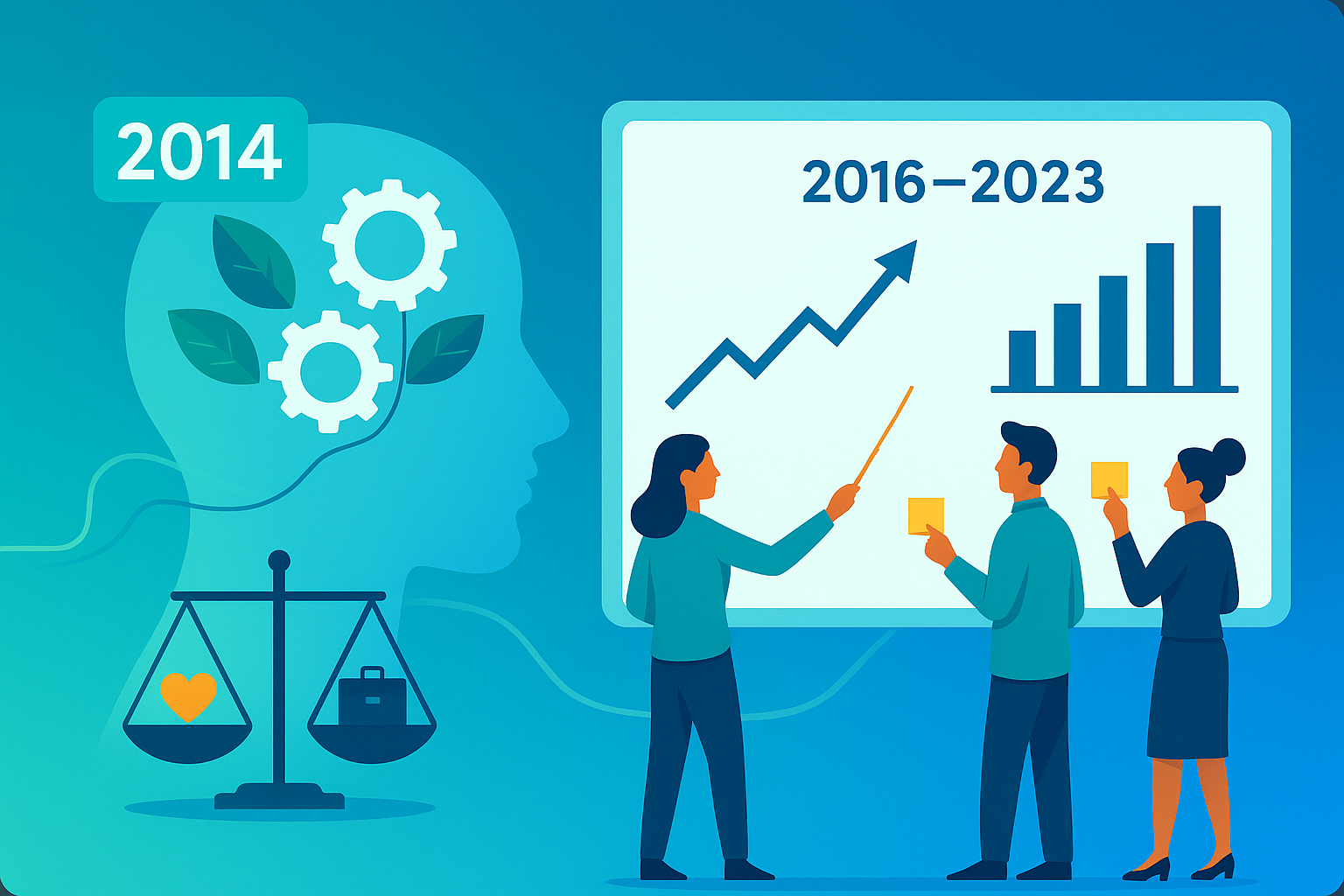
    This post extends my Mental Health in Tech analysis by harmonizing the 2014 OSMI baseline with waves from 2016–2023.

    What changes when we add in 2014?

    The central question this seeks to answer is: Do visible workplace supports- policy pillars (benefits, care_options, seek_help, anonymity, wellness_program)-still correlate with a higher likelihood of seeking treatment when we combine later OSMI waves with the 2014 baseline?

    TL;DR

    • Pooled OSMI waves (2014, 2016-2023) confirm and strengthen the Part-1 finding that visibility of supports correlates with higher treatment-seeking.
    • Bigger sample size tightens error bars and surfaces new significant contrasts between support groups.
    • The story didn’t change. Visibility is leverage, though the multi-year lens makes it louder and clearer.
    • If you raise support and make it impossible to miss, more people get help. That’s good for people and productivity.

    Quick observations from the pooled dataset

    • Demographics stable; age/gender mix comparable to 2014. 
    • Treatment-seeking higher than baseline in several later waves (2019 omitted).
    • Work interference grew (Sometimes/Often), but within-group treatment rates look comparable to the baseline.
    • Family history: “Don’t know” ~60% seeking treatment vs No ~30%, Yes ~80% -a practical flag.
    • Support score curve: steadier rise, plateau after ~3; more significant contrasts (0 vs >=1; 1 vs >=3; 2 vs >=3).

    Data & harmonization

    Single pipeline maps later-wave headers to 2014 semantics, recodes to Yes/No/Don’t-know, and builds the 0-5 support score. Data for 2019 lacks the treatment item. (Methods as in Part-1.). Stats: for >2 group comparisons, one-way Welch’s ANOVA followed by pairwise Welch’s t-test, and for 2 group comparisons Welch’s t-test was used. 

    What I found

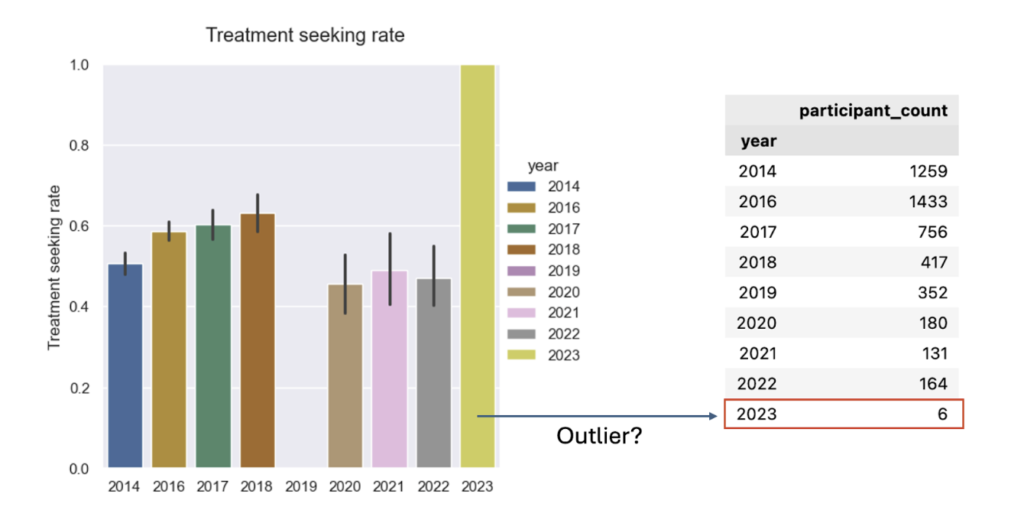
    1. Treatment-seeking over time: The multi-year picture shows higher treatment-seeking rates pre-2019 than post-2019. It’s important to note the apparent “dip” in 2019 is not a measured dip. In 2019 the treatment question was omitted, so that year’s rate is missing rather than lower.
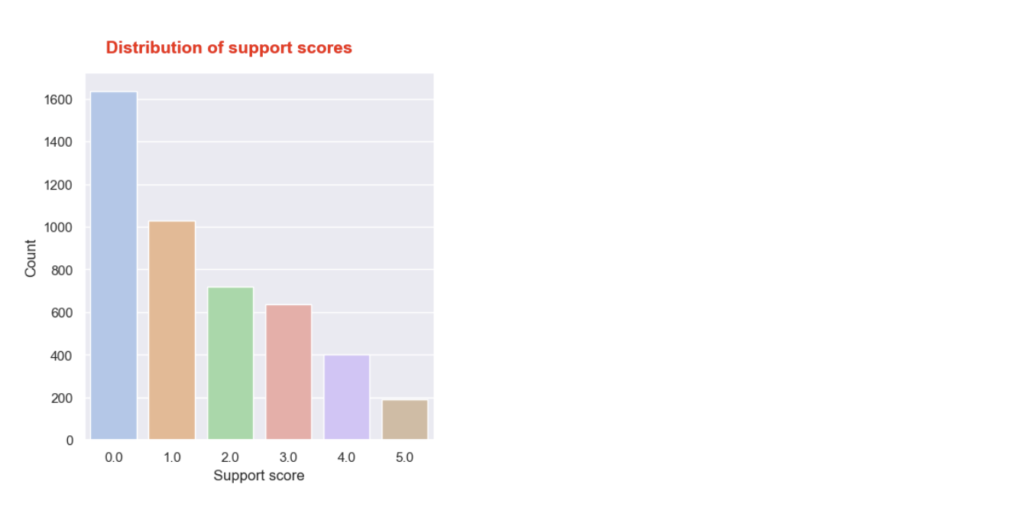
    1. Support score distribution: The distribution looks comparable to the one for 2014, but with a wider gap between scores 4 and 5. Again, most employees report receiving no or very little support.
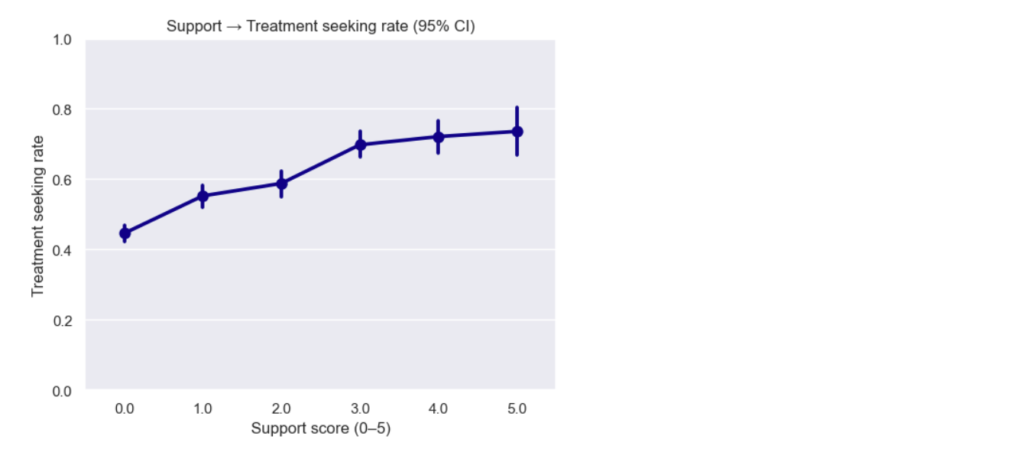
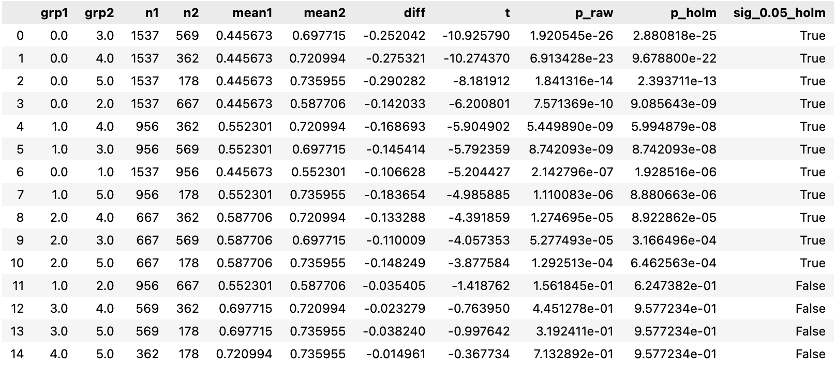
    1. Support score → treatment (dose-response): The pooled curve shows a steadier increase in treatment-seeking as support score rises, then plateaus after ~3. With many more responses, the error bars are smaller, so we can confidently see differences between more support-score groups. Stats reveal new significant pairwise differences:

    Stats reveal new significant pairwise differences:

    • Previously: 0 vs 0 vs 0 vs 0 vs ≥ ≥ ≥ ≥1 1 1 1, 1 vs 3
    • Now: 0 vs ≥ 1, 1 vs ≥ 3, 2 vs ≥ 3 (plus several neighbors trending)
    1. Policy awareness proportions (five questions): Awareness is still low. Aside from a modest improvement in the first question (proportion of “Yes” increased), most either worsened or stayed flat. Here, worse means more “No” and “Don’t know” responses. 
    1. Policy pillars → treatment (five questions) The pooled data reproduces 2014’s shape and adds a few new significant gaps:
    • Benefits vs. treatment. Proportions show slight improvement toward “Yes”. However, treatment-seeking rates remain comparable to the baseline. Having mental healthcare access is a major driver of treatment-seeking.
    • Care options awareness vs. treatment. Proportions and treatment-seeking rates remain comparable to baseline. Knowing how to access care represents the largest policy lift in the pooled data.
    • Seek-help resources vs. treatment. Proportions remain comparable to baseline. Treatment-seeking rates reveal a new significant gap: “No” ≠ “Don’t know.” (In 2014 this difference wasn’t significant). Uncertainty is its own risk. Providing practical guides to seek help can make a crucial difference for those who would pursue the help they need if they knew how to go about it. 
    • Anonymity protection vs. treatment. Proportions are comparable to baseline. Treatment-seeking rates for “Yes” differ from “No.” (In 2014 this difference wasn’t significant). Privacy clarity seems to carry significant weight here.
    • Wellness program (discussion) vs. treatment. Proportions and treatment-seeking rates are comparable to baseline. Providing mental healthcare in combination with wellness programs drives treatment-seeking.
    1. Family history vs. treatment The pooled data surfaced an “I don’t know” family-history group that wasn’t visible in 2014. Notably, ~60% of this group reported having sought treatment-about 2x the “No” group (~30%) yet below “Yes” (~80%). Uncertainty is an elevated-risk signal and should prompt proactive outreach (education, screening, benefits navigation) rather than being treated like “No.”
    1. Age & gender vs. treatment The monotonic age trend (older → higher treatment-seeking) persists; in the pooled data. However, age groups are now significantly different overall, elevating age as a potential risk factor to manage.
    1. Work interference vs. treatment The proportion of respondents reporting “Sometimes/Often” interference grew substantially vs. 2014; within category treatment-seeking rates (e.g., among “Sometimes/Often”) stayed comparable to the baseline.

    5 recommendations for tech business leaders

    1. Make support unmissable. The top gains still come from visibility. Accordingly, it is important to put benefits, access steps, and anonymity in onboarding, on the company’s intranet, and in managers’ 1:1 playbooks.
    2. Don’t let “Don’t know” persist. It tends to behave like “No” for outcomes. If you only fix one thing, fix discoverability.
    3. Train managers. They are the distribution channel for seek-help instructions and privacy assurances.
    4. Watch work interference. The Sometimes/Often group is larger than in 2014. In order not to shortchange people who need help, budget EAP/counseling capacity to meet that demand. 
    5. Mind the age gradient. Younger employees (especially men) continue to seek treatment less-target communication and manager nudges accordingly. 

    Limitations

    • Observational data. Associations ≠ causation.
    • Instrument differences. 2019 lacks the treatment item; later waves have smaller N.
    • Self-report bias. Outcomes and exposures are reported by respondents. 

    Where this could go next (subject to time & data quality):

    • Try a multivariable model to see which factors most strongly contribute to treatment.
    • Test policy importance by recomputing the support score while dropping one policy at a time.

    Acknowledgments

    Thanks to OSMI for maintaining and sharing the longitudinal survey, and to the NYC Data Science Academy community for feedback on the harmonization and plotting pipeline.

    References

    1. Mental Health in Tech: Which Workplace Policies Work?
    2. Tech’s ongoing mental health crisis
    3. Asana Anatomy of Work Index 2022
    4. The Health and Economic Burden of Employee Burnout to U.S. Employers

  • Learn About Markets with a Python Shiny Stock App

    Learn About Markets with a Python Shiny Stock App

    In this post, I’ll walk through a python shiny stock app I built to learn about markets hands-on. It bundles three tools-a Portfolio Simulator, Sector Explorer, and Event Study-so you can experiment with real NASDAQ & NYSE data without writing new code each time. 

    Note that this is intended for educational purposes only and should not be taken as financial advice.

    Live app: Portfolio, Sector & Event Lab

    Why I built this

    I built this python shiny stock app to give investors a single place where they can quickly explore their ideas and make more informed buying and selling decisions. In one workflow, you can backtest simple buy-and-hold strategies, compare sector performance side by side, and quantify how stock prices react to real events like earnings or SEC filings.

    The whole design leans into learning-by-doing: minimal clicks, assumptions stated up front, and exportable outputs you can take with you for deeper follow-up analysis.

    Some real questions

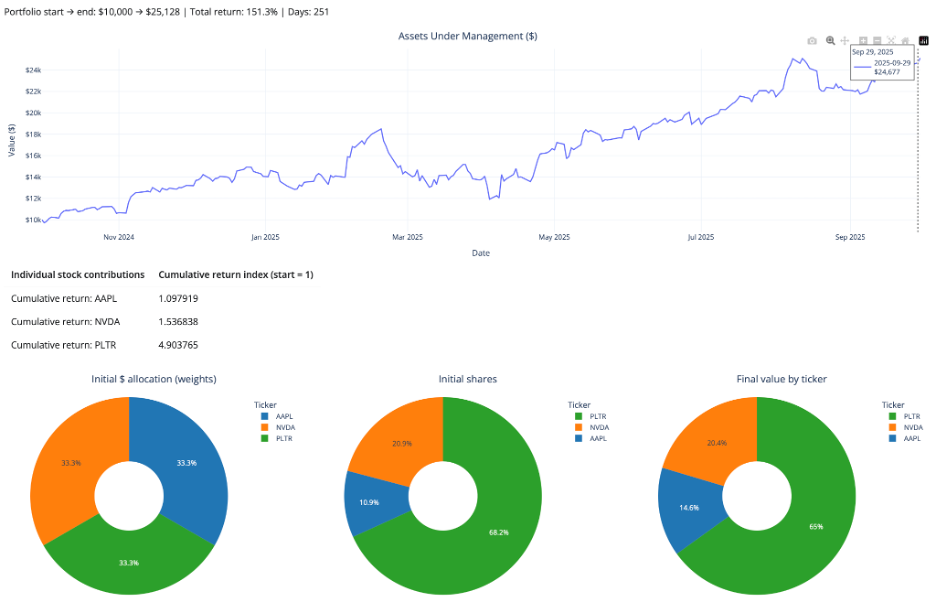
    • “I’m holding a small basket of stocks—say AAPL, NVDA, and PLTR—and I want to see how a simple buy-and-hold over a recent window would have actually played out. What would my path and final return have looked like?” (See chart below.)
      • With the Portfolio Simulator, I enter the tickers, set a date window, choose Equal vs. Inverse-price weighting, and hit Run. The app buys once at t₀ (the start of the selected window), then shows portfolio wealth, total return, and per-ticker normalized lines. There’s no rebalancing and no transaction costs-just a clean view of how that specific buy-and-hold position would have played out over the chosen period. 

    So, the answer to that first “real question” is: over this specific recent window, a simple equal-dollar buy-and-hold in AAPL/NVDA/PLTR would have more than doubled your money, with PLTR doing most of the heavy lifting.

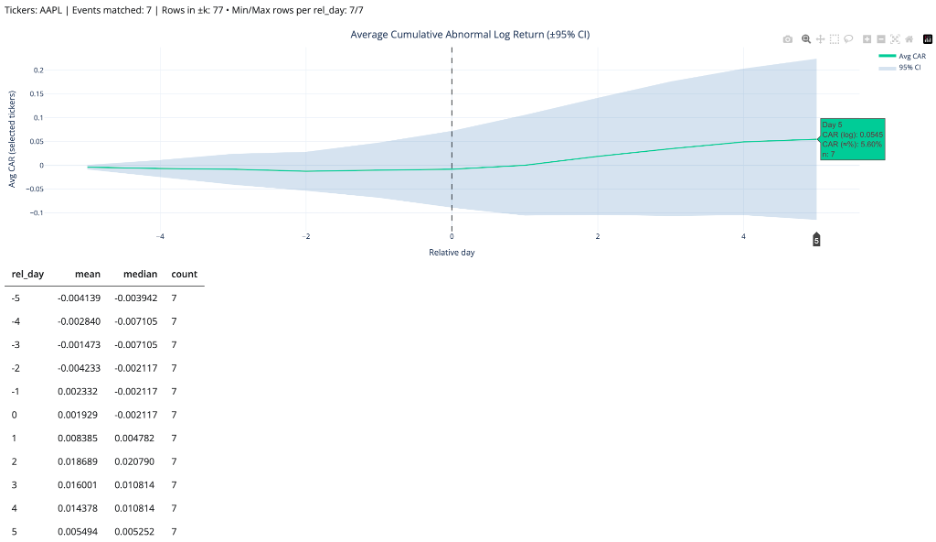
    • “I’m thinking about trading AAPL around 10-Q filings. Historically, have AAPL’s returns tended to react positively or negatively in the days around those filings?” (See chart below.)
      • With the Event Study, I choose the filing type (e.g., 10-Q), enter the ticker, set a date range and an event window in relative days, and hit Run. The app calculates and plots cumulative abnormal returns around each event, giving a compact view of how the stock has historically behaved in the days before and after those filings.

    So, the answer to the second “real question” is: in this sample, AAPL has on average drifted slightly down or sideways before 10-Q filings, then shows a modest positive abnormal move-around +5-6%-in the days following the filing (out to day +5), albeit with plenty of variability across events.

    What you can do (fast)

    1. Portfolio Simulator
      • Set tickers and dates; choose Equal (1/N) or Inverse-price (1/price₀); run.
      • Outputs: wealth curve, total return, optional daily returns, per-ticker normalized lines, CSV export.
    2. Sector Explorer
      • Pick sectors and a window; build equal-weight sector indices (base=1) and view returns/rolling stats.
      • Outputs: indexed curves + simple table of window returns (cap-weighting on the roadmap).
    3. Event Study
      • Enter one or more dates and a ± window (trading days).
      • Outputs: AR/CAR by event and an average path when multiple dates are provided; day-0 aligned plot; CSV. (Expected return = 0 → ARₜ = rₜ)

    Under the hood (transparent by design)

    I built the dataset myself to avoid rate-limit surprises and keep the python shiny stock app feeling snappy even when working with thousands of tickers. The notebook pulls NASDAQ + NYSE tickers, filters out non-common stocks, downloads price history via yfinance, and writes a tidy daily panel suitable for quick analysis.

    The pipeline saves both Parquet and CSV and is safe to re-run. It merges fundamentals, computes returns, and writes analysis_enriched.parquet/.csv. For the live app, I ship a compact outputs/sample.parquet slice (1-year window). That way the UI stays snappy, while the full 3-year panel remains in outputs/analysis_enriched.parquet.

    The presentation summarizes scope and scale-~3.8M+ rows across 31 columns-covering thousands of U.S. tickers with filing/split annotations. Visit my GitHub repo for more details on the dataset builder pipeline, sample builder and app scripts.

    Try it yourself

    1. Portfolio: AAPL MSFT PLTR QUBT (last 12 months) → compare Equal vs Inverse-price.
    2. Sectors: Technology, Healthcare, ETF/Fund → normalize to base=1; scan drawdowns.
    3. Events: Forms 144 and 144/A, Technology sector, 2024/09/30-2025/09/30, k=3 → inspect AR/CAR around day 0.

    Roadmap for the python shiny stock app

    • Market-cap and other weighting schemes. 
    • Event baselines (constant-mean / market-model / Fama-French).

    Credit

    Grateful to NYC DSA mentors/alumni for thoughtful feedback and to the maintainers of Shiny for Python, yfinance, yahoo_fin, yahooquery, and the SEC EDGAR team.

  • The Moneyball of Real Estate: Ames housing price prediction

    The Moneyball of Real Estate: Ames housing price prediction

    This post walks through my Ames housing price prediction project, where I built and deployed a machine learning ensemble to estimate sale prices.

    I. Introduction

    The Flipper’s Dilemma In real estate, the line between a “deal” and a “money pit” is often invisible. Most investors rely on gut feel or “back-of-the-napkin” math to estimate a renovation’s return on investment (ROI). “If I add a garage, this house will surely sell for $30k more, right?”

    I wondered: What if I didn’t have to guess? How could I be assured that the improvement I make to the home will increase its sale value by the amount I spent or more? My goal was to move beyond the standard Kaggle-style objective of simply predicting a price. I wanted to build a Decision Support System an end-to-end machine learning pipeline that not only predicts fair market value but mathematically identifies the highest-ROI renovation opportunities in Ames, Iowa. Using a tech stack of Python, Scikit-Learn, XGBoost, CatBoost, and Shiny, I turned a static dataset into a dynamic investment engine. 

    II. Data Engineering

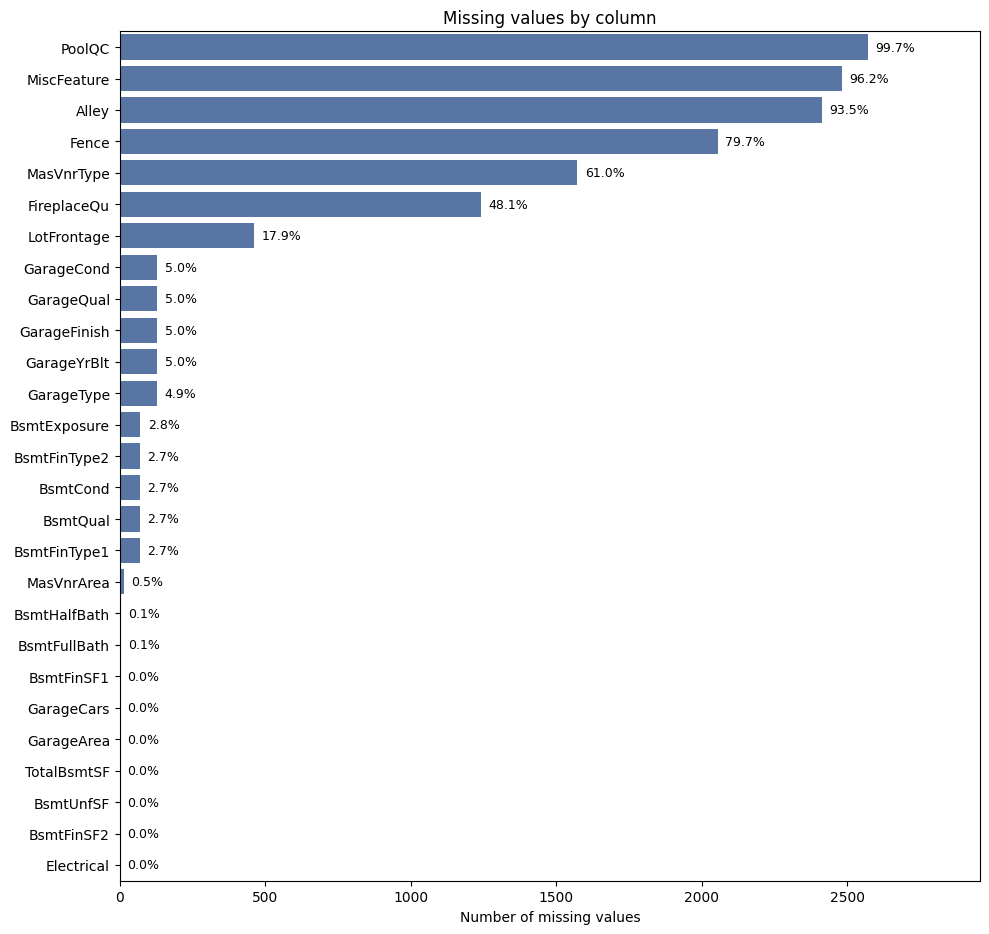
    The “None” Strategy Real-world data is messy, and the Ames dataset was no exception. Faced with over 80 columns of mixed quality data points, my first task was defining an imputation strategy that was robust enough for production.

    The dataset documentation suggested a manual approach -mapping specific NaN values to specific meanings (e.g., assuming a missing Pool Quality score meant “No Pool”). However, I decided to deviate from these manual rules to build a more generalized pipeline. Hard-coding specific assumptions for 80+ columns creates ‘technical brittleness’-a system prone to breaking if data schemas shift. I wanted a scalable architecture that applied consistent logic across the board, reducing the risk of human error and making the pipeline easier to maintain in production. 

    • The Strategy: Instead of manually hard-coding definitions for every column, I adopted a systematic imputation strategy.
      • Categorical Data: I filled all missing values with the string “None”. This treated “missingness” as its own distinct category, allowing the model to learn the signal behind the absence of data without me imposing assumptions.
      • Numerical Data: I imputed missing values with the Median.

    This decision paid off. Letting the model interpret the “None” category resulted in it learning that missing values in key columns like BsmtExposure were strong signals of lower value. While the data dictionary instructs us to manually map these NaNs to “No Basement,” my approach allowed the model to mathematically validate this relationship independently-effectively capturing the “lack of feature” penalty without requiring complex manual mapping scripts.

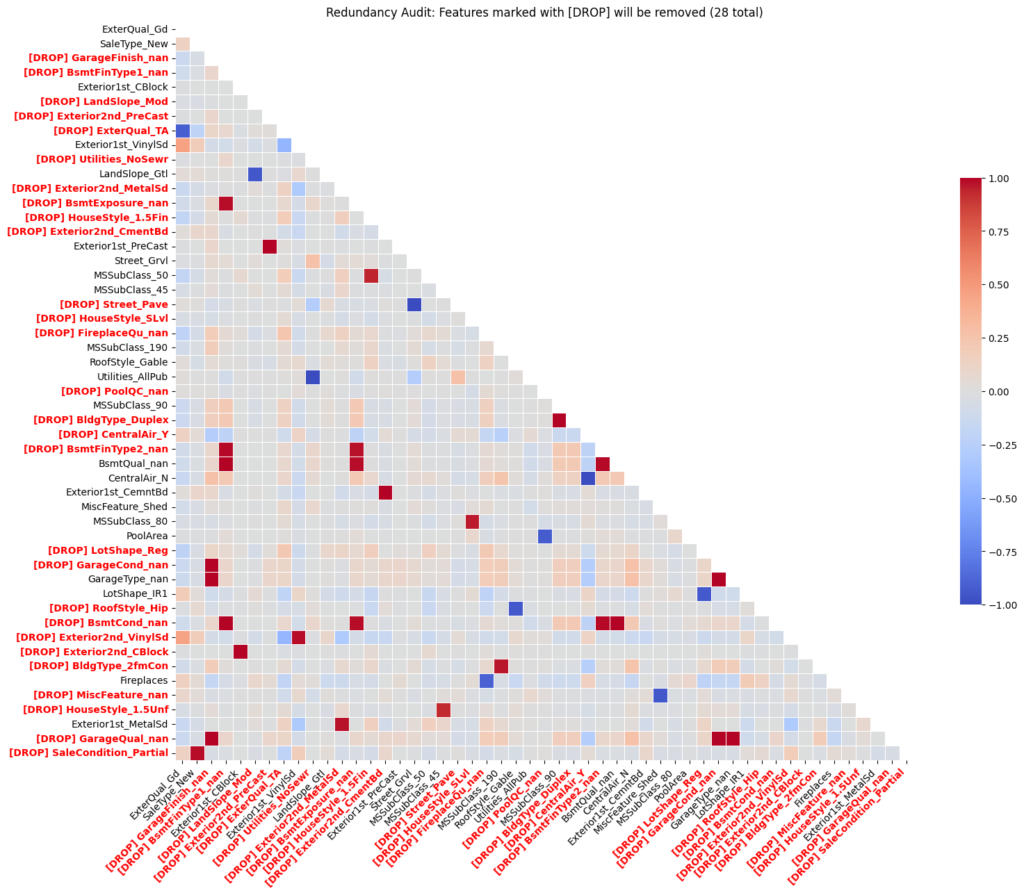
    To ensure the model remained lean, I performed a “Redundancy Audit.” Using a Correlation Threshold, I identified features that were essentially saying the same thing, By cutting the fat and removing multicollinear variables, I reduced the risk of overfitting and ensured that each coefficient in my final model had a clear, independent meaning.

    III. The Model Battle Royale

    Glass Box vs. Black Box I approached modeling as a competition between two philosophies: the interpretable “Glass Box” and the high-performance “Black Box.”

    Phase 1: The Glass Box (Linear Models)

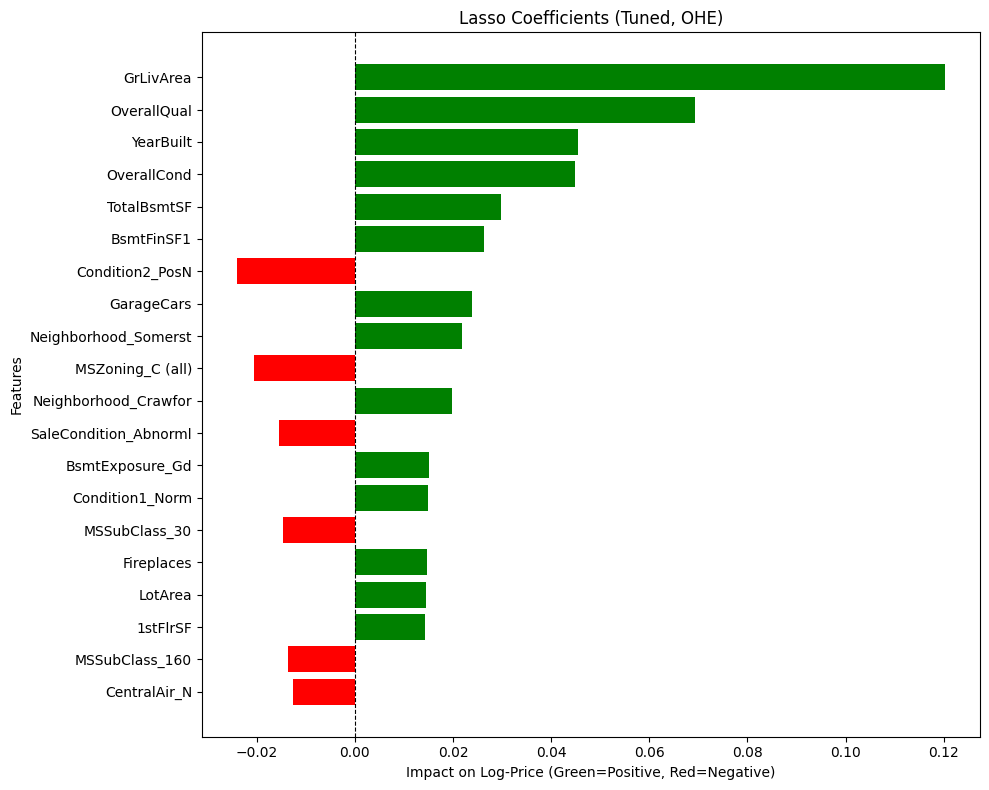
    I started with OLS, Lasso, Ridge, and ElasticNet. These models are the “strict accountants” of machine learning. They are highly interpretable, allowing me to see exactly how many dollars a fireplace adds to the price tag. But they struggle with nuance.

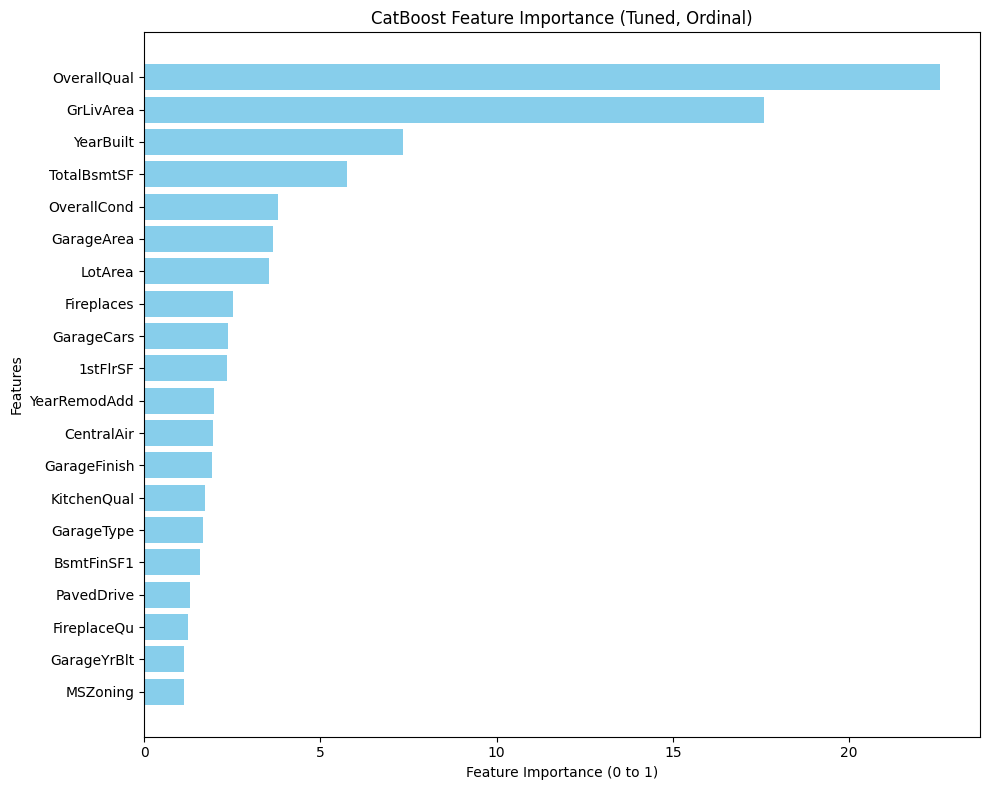
    • The Finding: While ElasticNet tried to be the “pragmatist” by taming the Living Area coefficient (reducing it from Lasso’s >0.12 to ~0.10), Lasso emerged as the clear winner, achieving the highest mean Cross-Validation R2 (0.8899) of all the linear models. Lasso proved to be “Size Obsessed,” assigning massive value to Ground Living Area, but it also provided the most sensible prioritization of the fundamentals: Overall Quality (fit and finish), Overall Condition (maintenance), and Year Built (age). It effectively zeroed out “noise” like Pool Area, telling me: “Ignore the fluff. The safest way to add value is to maintain the property and make it bigger.”
    • The Lesson: Trust the coefficients, not just the score. My OLS baseline produced a competitive R2, but inspecting the coefficients revealed it was “fitting the noise.” Due to multicollinearity, OLS made illogical trade-offs. For example, it assigned a positive value to YearBuilt but a negative penalty to SaleType_New, despite these features describing the same “newness.” 

      Regularization (Lasso/Ridge) didn’t just tune the model; it acted as a “Logic Filter,” dampening these contradictions to ensure the model’s advice was not just statistically accurate, but practically sound.

    Phase 2: The Black Box (Tree Models & SVR)

    Next, I moved to the non-linear powerhouses: SVR, Random Forest, XGBoost, and CatBoost. This wasn’t just about trying different algorithms; it was about finding the right architectural fit.

    • The Honorable Mentions (SVR & Random Forest):
      • SVR (Linear Kernel): While stable and reliable in its feature attributions, SVR hit a performance ceiling with a CV score of ~0.87. It simply lacked the capacity to capture the complex, non-linear interactions required to break the 0.90 barrier.
      • Random Forest: This model revealed a fatal flaw I call “The Monolith.” It assigned a staggering 55% feature importance to a single variable-Overall Qual. This made the model unbalanced and dangerously sensitive to a subjective rating, failing to capture the nuance of the rest of the dataset.
    • The Champions (XGBoost & CatBoost): The Gradient Boosters changed the game, with both models exceeding 0.91 CV scores-the highest of any individual models tested.
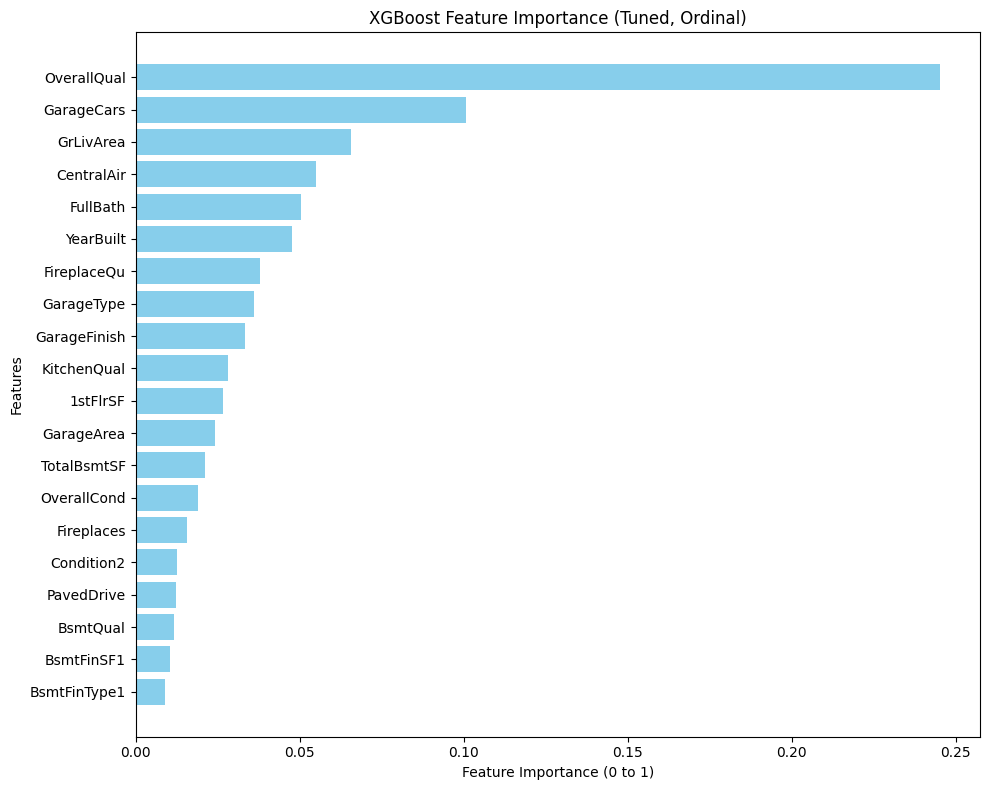
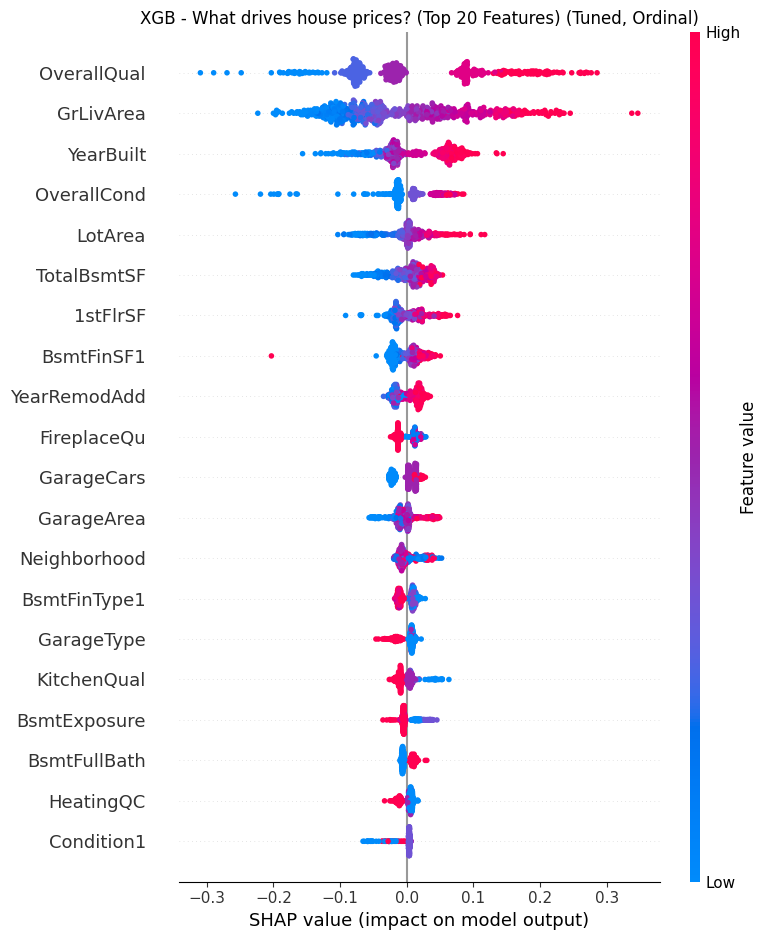
      • The Finding: Unlike Random Forest, they offered a balanced worldview. XGBoost emerged as the “Amenities Flipper,” ranking GarageCars as a top driver (even higher than living area), proving that premium features can outweigh raw square footage.
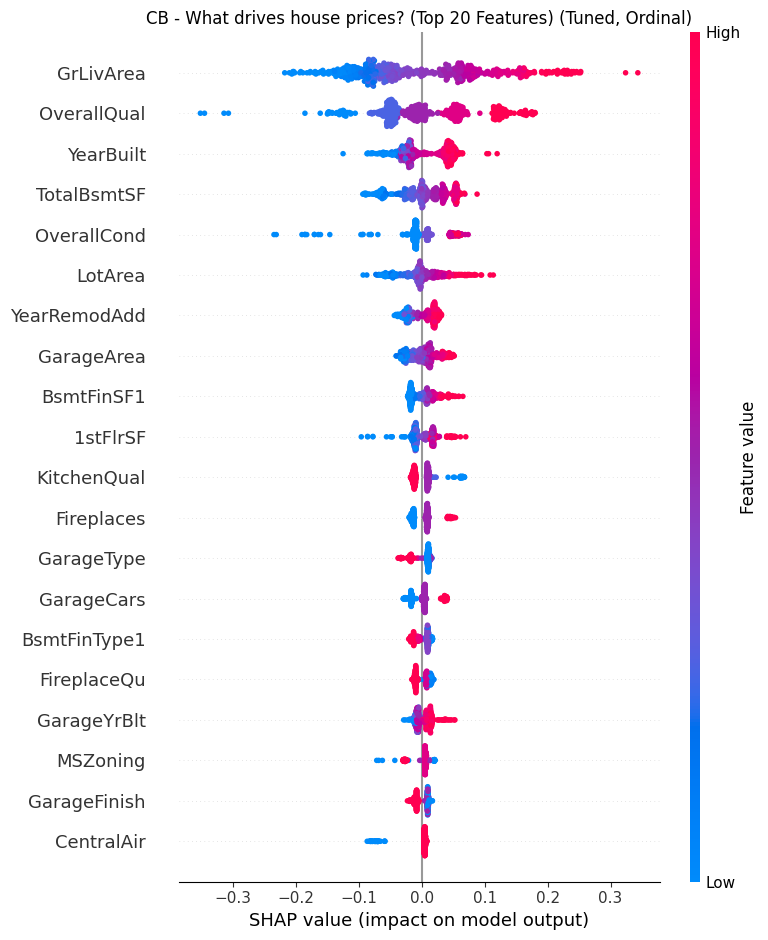
    • The Synergy: I selected both for the final ensemble because they are strong learners that “think” differently. XGBoost grows asymmetrically (leaf-wise) to capture specific, deep interaction rules, while CatBoost grows symmetrically (oblivious trees) to act as a regularizer. This structural diversity meant they could cover each other’s blind spots rather than repeating the same errors.

    • The Lesson: Don’t flatten the hierarchy. One-Hot Encoding destroys the natural order of real estate data (e.g., Excellent > Good > Poor), treating them as unrelated buckets. By switching to Ordinal Encoding, I preserved this mathematical rank, enabling the trees to make logical splits based on “Quality Thresholds” (e.g., Condition ≥7) rather than memorizing isolated features. This allowed the model to capture the “tipping points” where value accelerates.

    Phase 3: The “Super Model” (Voting Regressor)

    Why choose one worldview? I built a Voting Regressor that combines the disciplined baseline of Lasso (Weight: 1) with the aggressive precision of XGBoost and CatBoost (Weight: 2 each).

    • The Strategy: This hybrid architecture was designed to balance the “Square Footage” fundamentals (Lasso) with the “Luxury Amenity” premiums (Trees). The linear model provided a stable pricing floor, while the boosters captured the non-linear value ceilings that simple math missed. 
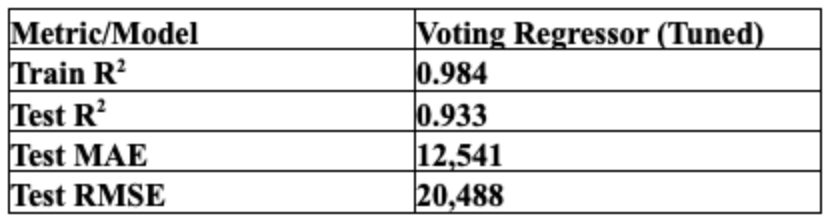
    • The Pipeline Feat: The real engineering challenge was data routing. I built a custom pipeline that simultaneously fed One-Hot Encoded data to the Lasso branch and Ordinal Encoded data to the Tree branches. This ensured every model received the data in its optimal format-preventing the “dilution” of the trees while satisfying the “math” of the linear model-ultimately driving the ensemble to a Test R2 of 0.933.

    IV. Productionizing

    From Lab to Factory A model in a notebook is a prototype; a model in an app is a product. The transition required solving the “Well, it works on my machine” problem. To productionize the Ames housing price prediction pipeline, I packaged preprocessing and inference behind a Flask REST API and a Shiny for Python dashboard.

    • The Unified Pipeline: I wrapped my entire preprocessing, imputation, and modeling logic into a single Scikit-Learn Pipeline. This means raw user input-JSON data-goes in, and a prediction comes out, without any manual data prep. 
    • Technical Spotlight: Custom Feature Engineering: Tο ensure the pipeline was robust and portable, I built custom classes-Feature Engineer and Correlation Threshold-that inherit directly from Scikit-Learn’s BaseEstimator and TransformerMixin. This architecture allowed me to bake complex logic directly into the pipeline object: 
      • Automated Engineering: My Feature Engineer class standardizes the creation of high-signal features like TotalSqFt, HouseAge, and TotalBath.
      • Geospatial Intelligence: If specific neighborhood data is provided, the class leverages the geopy package to fetch precise Latitude and Longitude coordinates, capturing micro-location value that simple labels might miss.
    • Artifact Management: I didn’t just pickle the model. I created a synchronized “Artifact Factory” that exports ames_model_defaults.pkl (to auto-fill missing user inputs) and ames_model_options.pkl (to populate the dashboard’s dropdowns dynamically). 
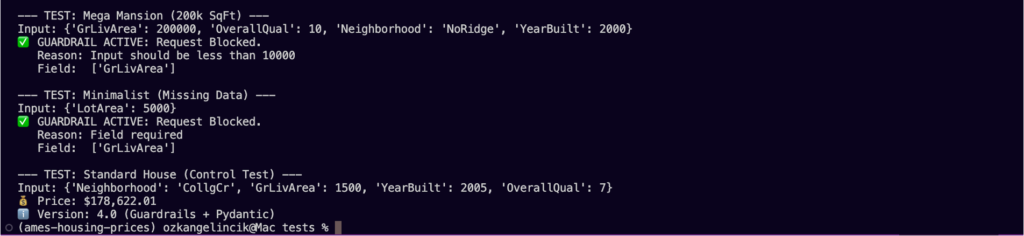
    • The Testing Suite: I built a three-tier testing framework to ensure reliability:
      • The Mega-Mansion Test (Safety): I fed the API a 200,000 sq ft house. Instead of crashing or predicting $500 Million, my tree-clamping logic kept the prediction grounded.
      • The Ghost House (Stability): I tested inputs with 0 sq ft to ensure the model threw appropriate errors rather than nonsensical prices.
    • The Renovation Check (Logic): I wrote scripts to verify that Price(Renovated) > Price(Base). If adding a garage didn’t increase the price estimate, the model failed the logic test.

    V. The “House Flipper Pro” Dashboard (Shiny)

    Finally, I visualized my engine using Python Shiny. I didn’t want a static report; I wanted a Deal Simulator. 

    Try the Live App Here: House Flipper Pro

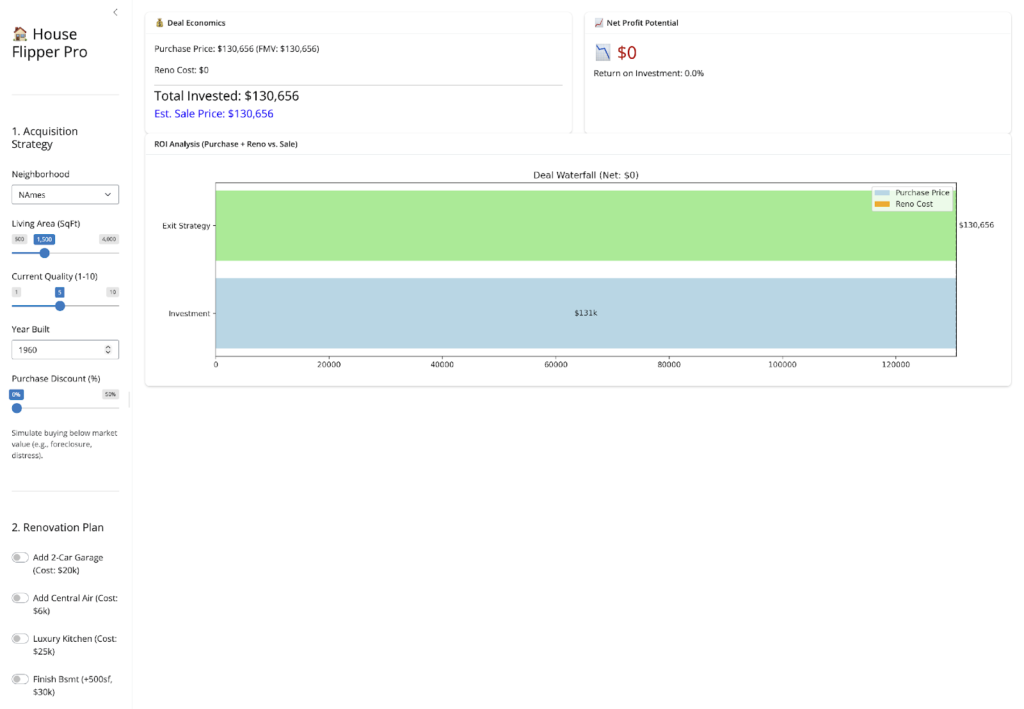
    • The Control Center: I built an interface that lets me tweak every variable-Neighborhood, Quality, Square Footage to hunt for “Unicorn” deals in real-time.
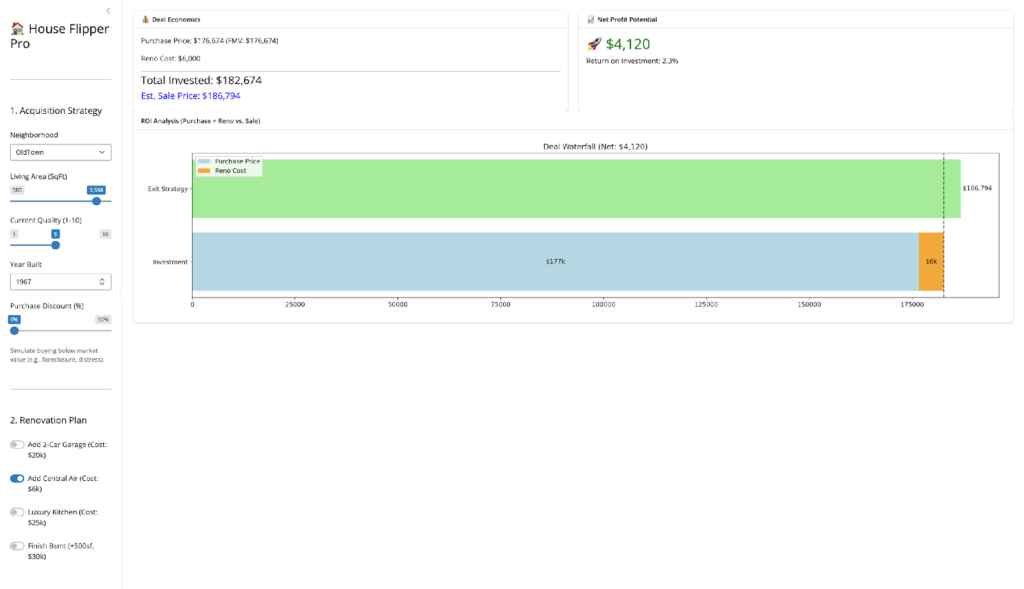
    • The Renovation Toggles: I added one-click buttons to simulate specific upgrades (e.g., “Add Central Air,” “Finish Basement”). This allows me to instantly see if a $20k garage adds $20k in value (Spoiler: usually not).
    • The Deal Logic: I included a “Purchase Discount” slider and a dynamic Waterfall Chart. This enforces the discipline of the model: showing visually that true profitability usually comes from the buy, not just the fix.

    VI. Strategic Takeaways: The Renovation Reality

    The most exciting part of this project wasn’t the code; it was the real estate strategy the model revealed. 

    • The “AC Arbitrage”: My model identified a consistent arbitrage opportunity in “Old Town.” Older homes there are heavily penalized for lacking Central Air. But I discovered a hidden multiplier: Square Footage. The data reveals that the market punishes the lack of central air far more severely in large homes than in small ones, creating a non-linear opportunity for value creation. 
      • The “Unicorn”: A large (2,500+ sq ft), Pre-1960s home without AC is the most profitable renovation target in the dataset. The market punishes these “obsolete” giants severely, so bringing them up to modern standards creates an outsized value lift compared to the fixed renovation cost.
    • The Garage Trap (vs. The Quality Leap): Conversely, the model warned me against adding garages without doing the math first. While many flippers assume a garage is a guaranteed “value-add,” the data tells a more complicated story.
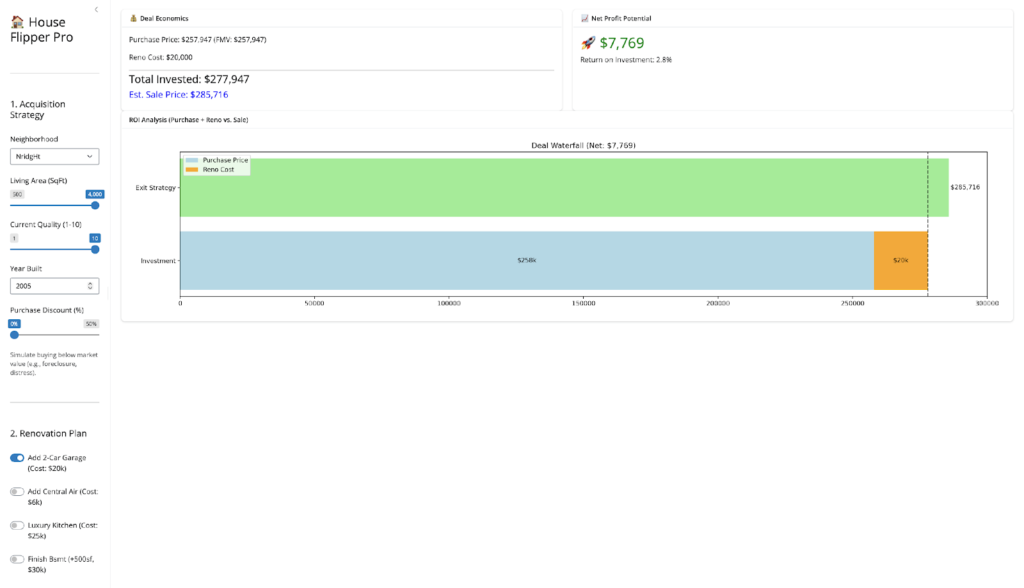
      • The Findings: As the simulation above shows, adding a 2-car garage in a top-tier neighborhood does increase value for larger, high-quality homes—generating a $7,769 profit (2.8% ROI) on a $20,000 investment. However, in lower-tier neighborhoods, this math often flips to a net loss. This surprise finding highlights the danger of “Over-Improvement.” Budget-conscious neighborhoods often have invisible price ceilings, meaning buyers simply cannot pay the premium for a brand-new garage, causing the fixed cost of construction to exceed the value added.
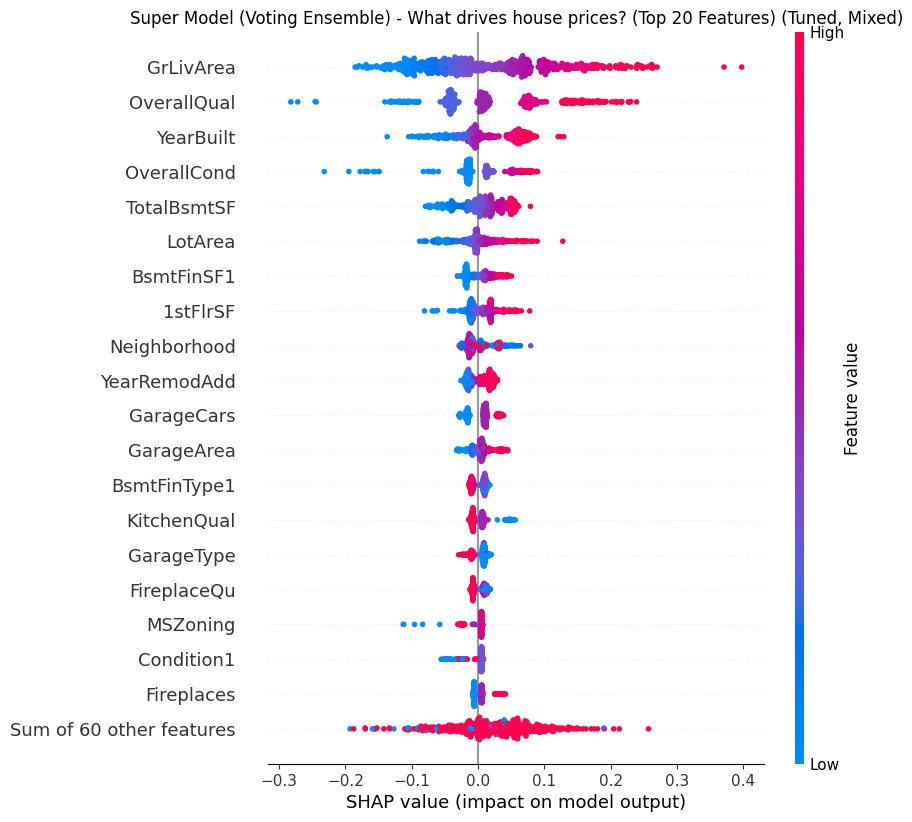
      • The Better Play: My “Super Model” (see SHAP summary below) revealed that Overall Quality is often a stronger, safer driver than amenities. Instead of risking $20k on a garage for a 2.8% return, the data suggests a higher and safer ROI comes from cosmetic upgrades (flooring, paint, fixtures) that bump a house from “Average” to “Good” condition—capitalizing on the model’s heavy weighting of the OverallQual feature.

    VII. Future Roadmap

    While the application is currently live and stable, the engineering journey continues. The next major step is Dockerization-containerizing the application to ensure it runs identically in any environment, eliminating the remaining “system dependency” risks and making the deployment truly cloud-agnostic.

    VIII. Conclusion

    The Golden Rule: Perhaps the most humbling finding from my Shiny app was this: Renovations rarely pay for themselves if you pay full price for the house. The “Purchase Discount” slider suggested that the best ROI doesn’t come from granite countertops; it comes from finding properties that are underpriced to begin with. My model confirms the old real estate adage: You make your money when you buy, not when you sell.

    By combining rigorous data engineering with a “Super Model” ensemble, I turned a static housing dataset into a dynamic tool for finding value. I didn’t just predict prices; I decoded the market’s behavior, proving that with the right data, you really can “Moneyball” real estate. 

    Launch the App